The Hostinger website builder is a versatile and beginner-friendly platform that makes creating a professional website simple and fast.
Whether you’re a small business owner, freelancer, or someone launching a personal blog, this all-in-one tool combines drag-and-drop editing, responsive templates, and AI-powered features to help you build a website without any coding knowledge.
In this guide, we’ll explore its key features, pricing, use cases, and how it stacks up against other popular website builders, so you can decide if it’s the right choice for your online presence.
Contents
What Is the Hostinger Website Builder?
The Hostinger website builder is an all-in-one, drag-and-drop platform designed to help beginners, entrepreneurs, and small businesses create a professional website without needing any coding skills.
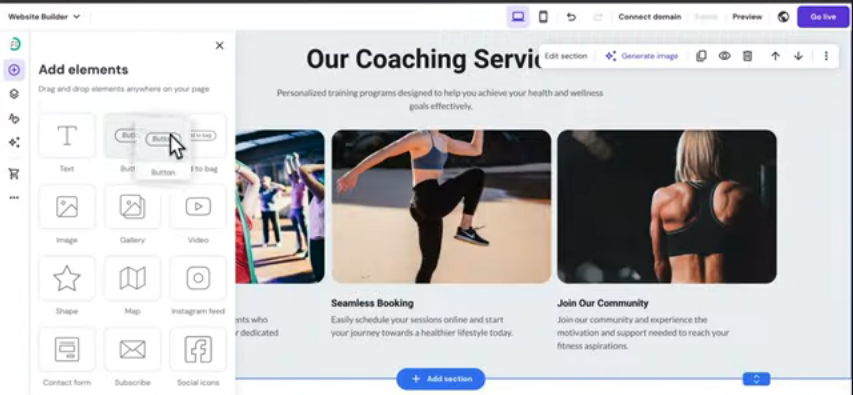
Built directly into Hostinger’s hosting plans, it combines ease of use with powerful AI-driven features, allowing users to launch fully functional websites in just minutes.
At its core, the platform provides a visual editing experience: you simply click, drag, and customize elements to build pages.
The interface is clean, intuitive, and structured to help users quickly adjust layouts, colors, images, and text.
Whether you want a personal blog, a business website, an online store, or a portfolio, the Hostinger website builder offers templates and tools to support a wide range of use cases.
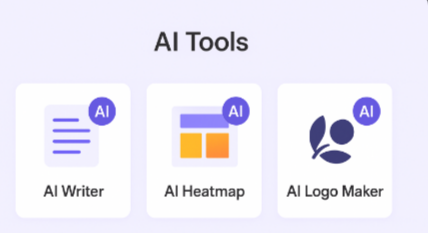
Beyond design, the builder includes an integrated suite of AI tools, such as an AI writer, AI heatmap prediction, and an AI logo generator, to streamline the website creation process.
These tools help users make smarter design decisions, produce content faster, and maintain a polished brand presence, even without design or copywriting experience.
The Hostinger website builder is also optimized for speed and performance. Because it runs on Hostinger’s global infrastructure, websites load quickly and maintain stable uptime.
This is especially valuable for small businesses that need reliable performance without a complex technical setup.
In simple terms, the Hostinger website builder provides everything you need, templates, hosting, AI features, eCommerce tools, and support, inside one streamlined platform.
It eliminates the need to purchase multiple services or learn advanced technical skills, making it a practical choice for anyone looking to launch a professional site efficiently.
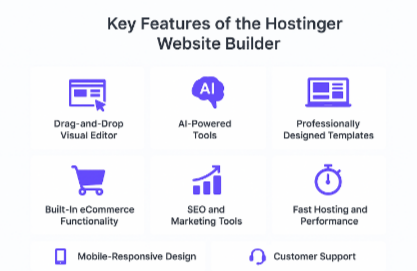
Key Features of the Hostinger Website Builder
The Hostinger website builder includes a robust suite of tools designed to help users create professional-quality websites quickly and without technical experience.
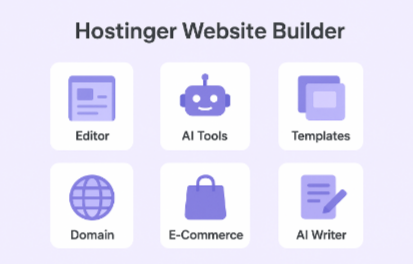
Its feature set focuses on simplicity, performance, and built-in automation, making it suitable for beginners as well as small businesses looking for an efficient website solution.
1. Drag-and-Drop Visual Editor
The platform offers an intuitive drag-and-drop editor that allows you to customize pages effortlessly.
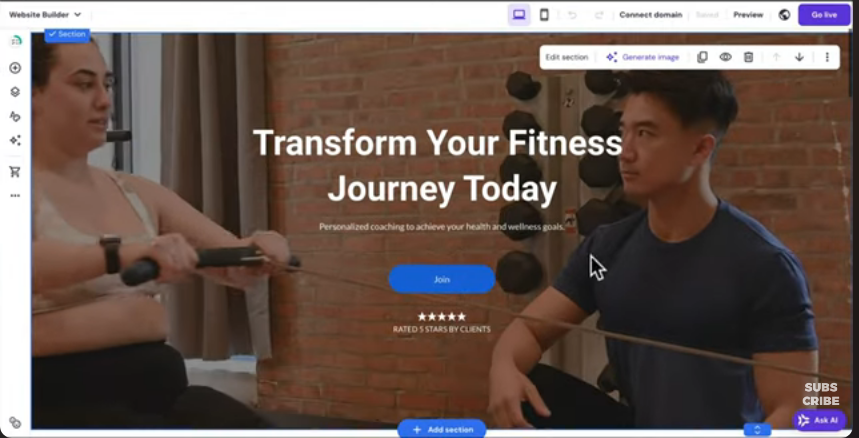
You can move elements, adjust layouts, and modify content directly on the screen, making the building process fast and user-friendly.
2. AI-Powered Tools
One of the standout advantages of the Hostinger website builder is its integrated AI suite. These tools include:
- AI Writer: Generates on-page text for blogs, product pages, and landing pages.
- AI Heatmap: Predicts user attention patterns to help you optimize conversions.
- AI Logo Maker: Helps you design a brand-ready logo in minutes.
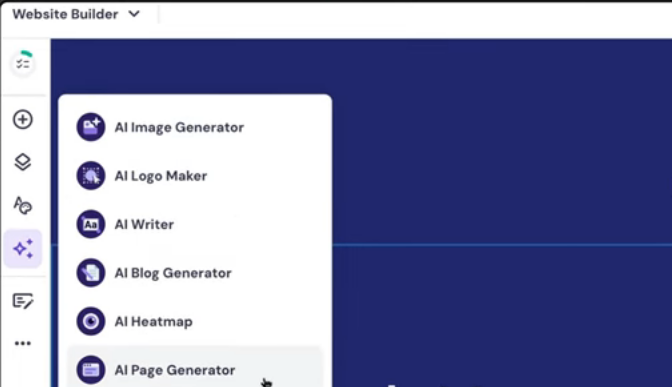
These AI features reduce guesswork and help users produce polished content efficiently.
3. Professionally Designed Templates
The builder includes a wide selection of responsive templates optimized for different industries, business, eCommerce, services, portfolio, and personal websites. Every template can be fully customized to match your brand.
4. Built-In eCommerce Functionality
Users can set up a complete online store without installing plugins. Features include product management, inventory tools, order tracking, coupon creation, and seamless payment integrations.
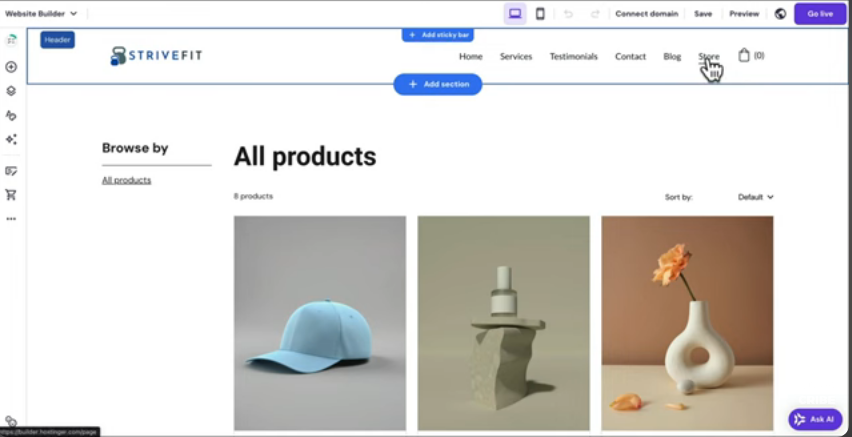
This makes the Hostinger website builder a practical solution for small retailers or service businesses.
5. SEO and Marketing Tools
The builder provides essential SEO settings such as custom meta titles, descriptions, alt text, URL structure control, and mobile optimization.
It also integrates with marketing tools like Google Analytics and Facebook Pixel to support performance tracking.
6. Fast Hosting and Performance
Because the builder sits on Hostinger’s hosting infrastructure, websites benefit from fast load speeds, global CDN support, and strong uptime reliability.
This is critical for ranking well on Google and providing a smooth user experience.
7. Mobile-Responsive Design
Every website created with the Hostinger website builder automatically adjusts to mobile devices. You can preview and edit your site for different screen sizes to ensure consistency across all devices.
8. Customer Support
Users have access to 24/7/365 customer support through Hostinger’s chat system. Tutorials, documentation, and guided steps within the builder also help users troubleshoot issues quickly.
Pros and Cons of the Hostinger Website Builder
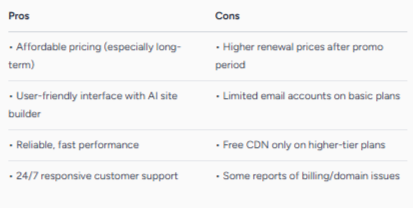
The Hostinger website builder offers a strong balance of simplicity, flexibility, and performance, butlik, e any platform, it also has limitations.
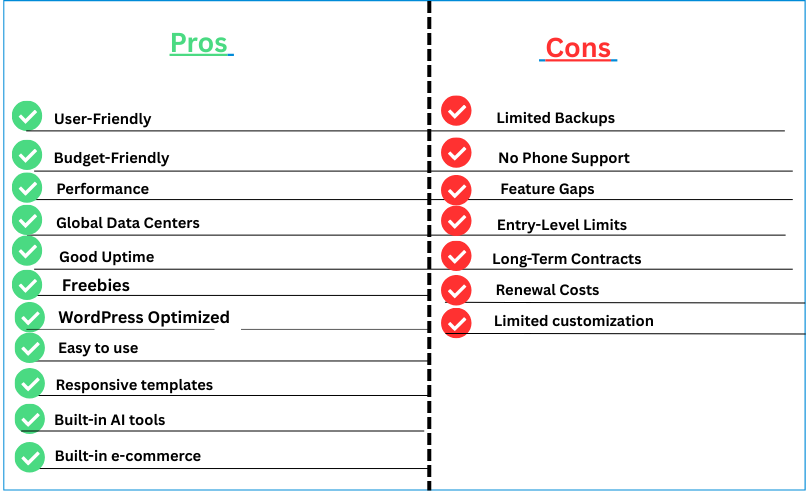
Understanding these pros and cons will help readers decide whether it is the right solution for their website needs.
Pros
1. Easy-to-Use Drag-and-Drop Interface
The platform’s visual editor is intuitive and beginner-friendly. No coding knowledge is required, making it ideal for first-time website owners.
2. Powerful AI Tools Included
From AI writing to heatmap predictions and logo creation, the builder includes valuable automation tools that streamline content creation and design.
3. Fast Hosting Performance
Because the Hostinger website builder is built on Hostinger’s hosting infrastructure, websites benefit from strong uptime, fast load speeds, and reliable performance.
4. Affordable Pricing
Compared to competitors like Wix or Squarespace, Hostinger’s website builder is one of the most cost-effective all-in-one solutions on the market.
5. Built-In eCommerce Capabilities
Users can set up a functional online store without plugins. Product management, inventory, coupons, and checkout tools are all included.
6. Modern, Responsive Templates
The builder offers a wide range of clean, professional templates that automatically adjust for mobile, tablet, and desktop devices.
7. SEO Tools Included
Meta tags, alt text, URL control, and mobile optimization are built into the system, making it easier to improve visibility on search engines.
Cons
1. Less Flexible Than Open-Source Platforms
While easy to use, the builder does not offer the full customization depth of platforms like WordPress, especially for advanced users.
2. Limited Third-Party Integrations
Compared to larger platforms, integration options are more limited. Users who rely heavily on external tools may find this restrictive.
3. Template Switching Is Not Seamless
Changing templates after building your pages requires adjustments, which can be inconvenient for users who want to redesign frequently.
4. eCommerce Not Ideal for Large Stores
The built-in store features work well for small businesses, but larger stores with complex inventory or advanced automation requirements may outgrow the system.

Hostinger Website Builder Pricing
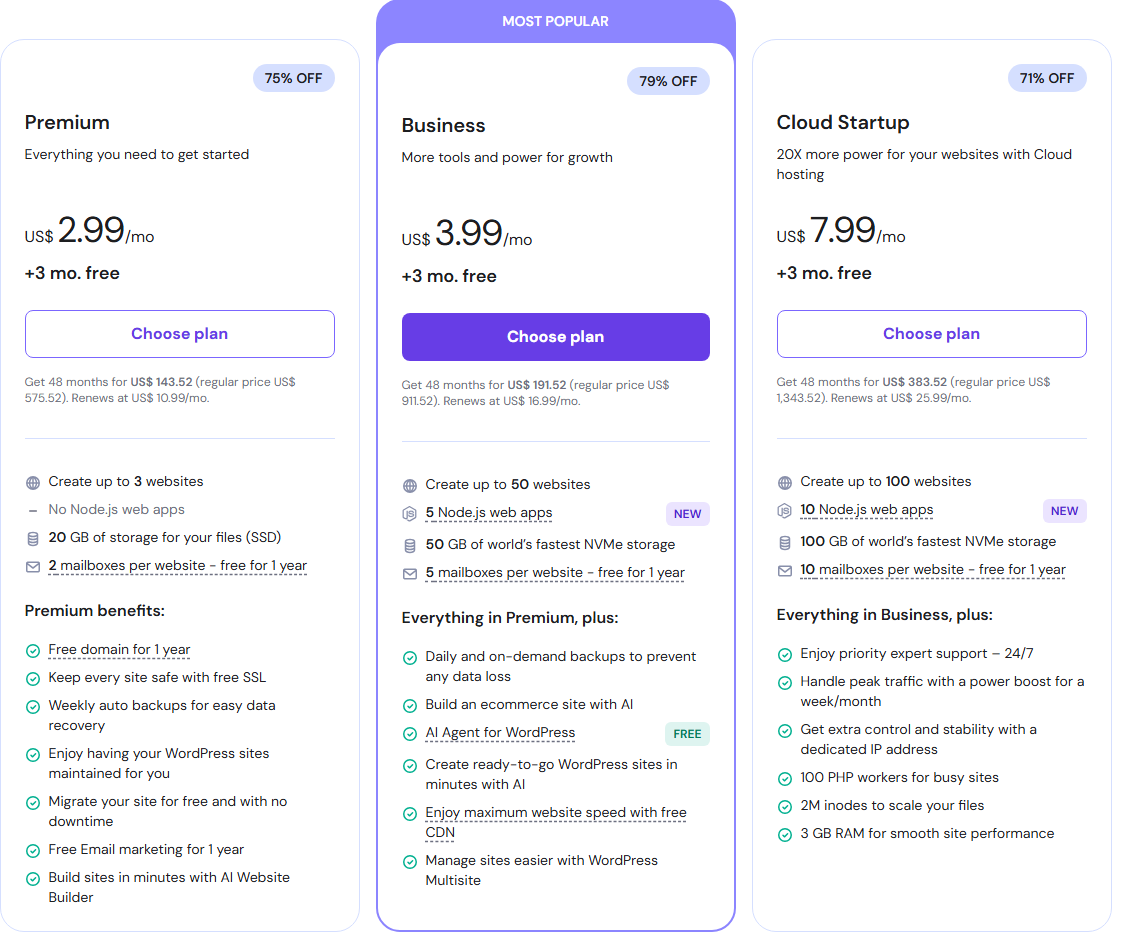
Understanding the Hostinger website builder pricing structure is essential when choosing the right plan for your project. Hostinger offers tiered plans designed to fit different needs and budgets, ranging from basic sites to fully featured online stores.
Plan Overview
Hostinger’s website builder plans are primarily divided into two main tiers:
1. Premium Website Builder
- This is the entry-level offering, designed for simple websites such as personal blogs, portfolios, or small business landing pages.
- Promotional pricing can start as low as roughly $1.95–$2.99 per month when you commit to a longer term (such as 24 or 48 months upfront).
- After the initial term, typical renewal pricing is higher (around $10.99 per month).
- It includes AI website builder tools, a free domain for one year, responsive templates, free SSL, basic SEO tools, and essential hosting capabilities.
2. Business Website Builder
- The Business tier adds eCommerce functionality and more advanced AI tools, making it a better choice for small online stores and growing businesses.
- With long-term promotional deals, pricing can start near $2.75–$3.99 per month, while standard renewals are typically around $13.99–$16.99 per month.
- It supports selling online with product management, multiple payment methods, larger storage, and expanded AI content tools.
Key Pricing Considerations
- Billing Term Discounts: Hostinger significantly reduces its listed monthly rates when you choose longer billing cycles (12, 24, or 48 months). Paying upfront for a multi-year term yields the lowest effective monthly cost.

- Money-Back Guarantee: All Hostinger website builder plans include a 30-day money-back guarantee. This lets you test the platform risk-free and cancel if it doesn’t meet your needs.
- Renewal Pricing: Promotional prices apply during the first term only; renewal rates are higher. Renewals typically reset to regular list pricing unless you secure a new promotional deal.
- Domain and Email: A free domain is usually included for the first year; after that, domain renewals and professional email services may carry additional costs.
Which Plan Is Right for You?

- Beginners and Personal Sites: The Premium Website Builder is often sufficient for personal sites, portfolios, blogs, and simple business pages.
- Small Businesses & eCommerce: The Business Website Builder plan is better suited when you need online store features, more storage, advanced AI tools, and higher email allotments.
- Scaling Needs: If you expect rapid growth or heavy traffic, you’ll want to consider how storage, product limits, and advanced support in higher tiers align with your goals.
How the Hostinger Website Builder Compares to Other Builders

When choosing a website builder, comparing the Hostinger website builder to other popular platforms helps you understand where it excels and where it may fall short.
The competitive landscape includes established builders like Wix, Squarespace, and specialized platforms like Shopify, each with unique strengths depending on your needs.
Hostinger vs Wix
Ease of use & pricing

Hostinger’s website builder is generally more affordable and straightforward than Wix, particularly for small sites and basic eCommerce needs.
Wix offers a free plan and a larger app market, giving users more features and extensions, but at higher price points and complexity.
Hostinger keeps things simple with a streamlined drag-and-drop interface that many beginners find easier to navigate.
Feature Breadth
Wix offers a broader feature set, especially for large ecommerce stores and advanced marketing tools, and supports up to tens of thousands of products.
In contrast, Hostinger’s builder is solid for smaller online shops (up to about 500 products) but lacks some advanced store features, shipping options, and multichannel selling tools found in Wix.
Best Fit
- Hostinger: Budget-friendly, beginner-oriented websites
- Wix: Users seeking extensive features, customization, and scalability
Hostinger vs Squarespace
Design and Templates
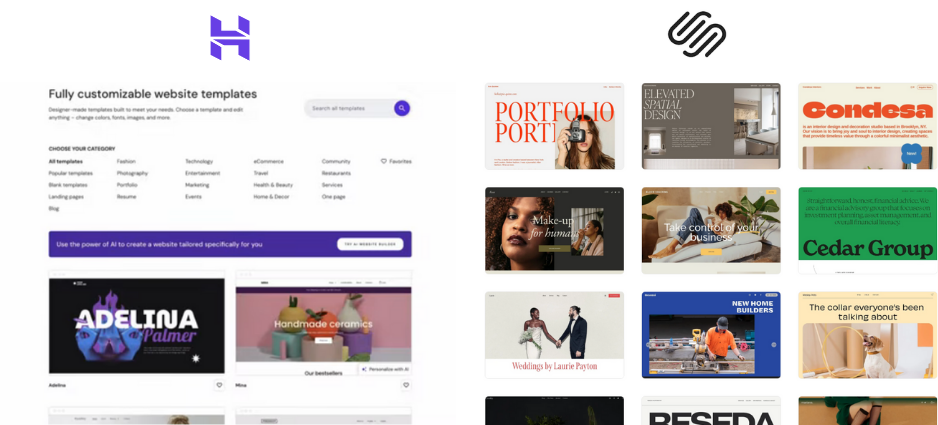
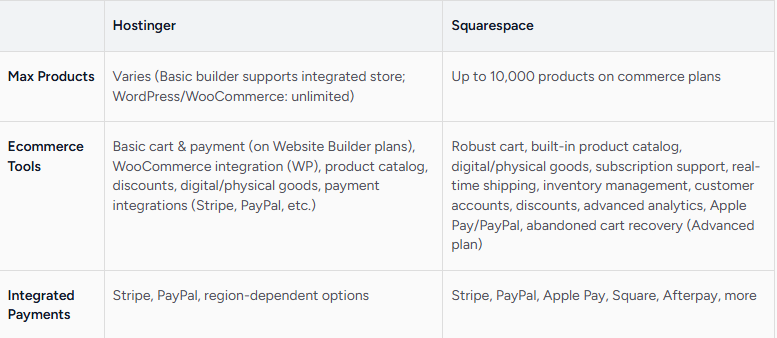
Squarespace is known for visually striking, designer-grade templates, offering more advanced design flexibility and built-in features like email campaigns and detailed analytics.
Hostinger’s templates are professional and responsive, but less comprehensive in customization and built-in marketing tools.
E-Commerce and Marketing
Squarespace provides more ecommerce tools and integrations, including subscription management and built-in promotional features. Hostinger supports ecommerce basics suitable for small stores but doesn’t match Squarespace’s depth in commerce and analytics.
Best Fit
- Hostinger: Small businesses and personal sites looking for simplicity and value
- Squarespace: Creative professionals and medium businesses needing advanced design and marketing features
Hostinger vs Shopify
E-Commerce Focus
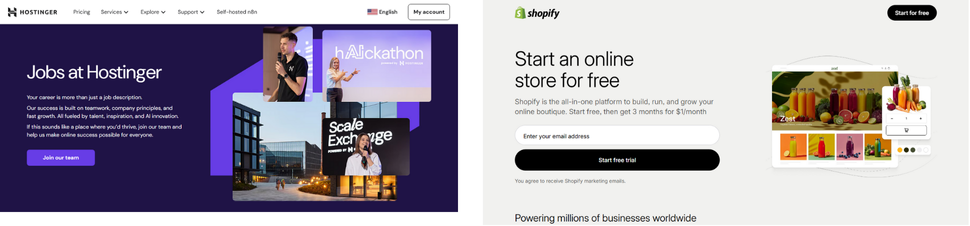
Shopify is a dedicated ecommerce platform with advanced sales, reporting, marketing automation, and app integrations, making it ideal for medium to large online stores.
Hostinger’s website builder includes ecommerce functionality, but it is best suited for smaller catalogs and simpler ecommerce setups.
Best Fit
- Hostinger: Small ecommerce businesses that need affordability and ease of use
- Shopify: Mid-to-large ecommerce operations requiring deep sales and analytics tools
Hostinger vs WordPress.com (Website Builder/Hosted)
Flexibility and Ecosystem
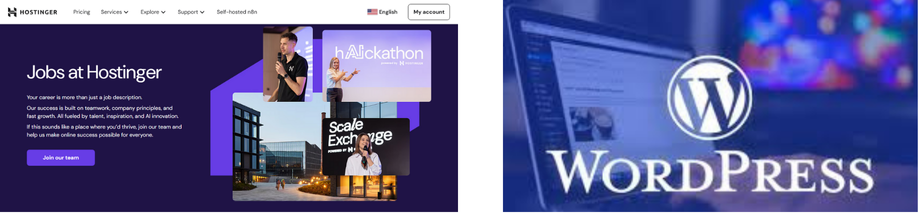
WordPress.com and self-hosted WordPress offer massive ecosystems with plugins, themes, and developer flexibility far beyond what Hostinger’s website builder can provide.
However, this additional power comes with complexity and a steeper learning curve.
Customization
Hostinger remains easier for beginners through its drag-and-drop system, but WordPress wins in terms of extensibility and control, appealing to users who want to scale or customize heavily.
Best Fit
- Hostinger: Users who prioritize simplicity and integrated hosting
- WordPress.com: Users needing maximum flexibility and feature depth

Use Cases: Who Is the Hostinger Website Builder Best For?
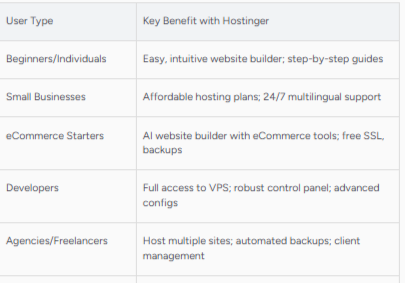
The Hostinger website builder is designed to serve a wide range of users who want a simple, affordable, and fast way to build a professional website.
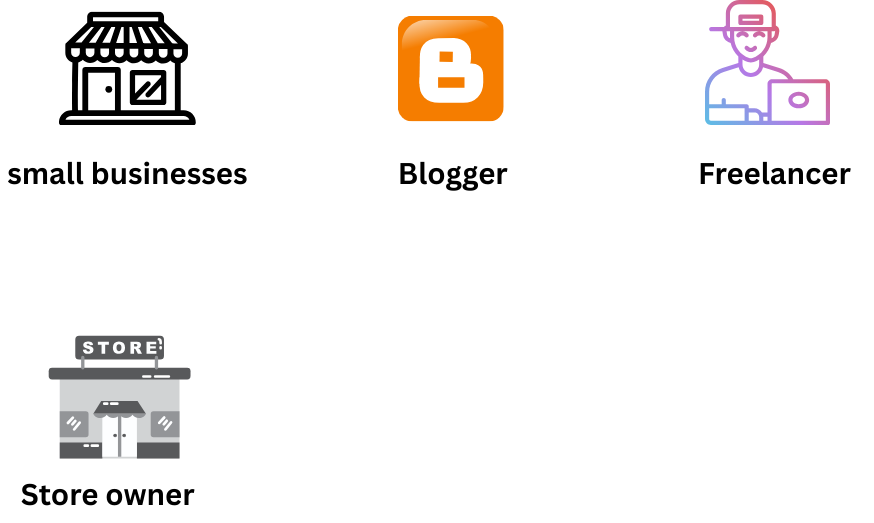
Its combination of drag-and-drop editing, AI tools, and built-in hosting makes it especially appealing to individuals and small businesses that need high-quality results without technical complexity.
 1. Beginners Building Their First Website
The builder’s straightforward interface is ideal for anyone launching their very first website. No coding knowledge is required, and the AI tools can help generate content, design layouts, and guide structure.
This makes the platform suitable for complete beginners who need a frustration-free setup.
 2. Small Business Owners
Small businesses, such as local service providers, agencies, consultants, or independent shops, can quickly create modern, professional websites with built-in SEO tools and strong performance.
The platform keeps costs low while providing all the essentials: templates, branding tools, contact forms, and eCommerce if needed.
 3. Freelancers and Creatives
Graphic designers, writers, photographers, coaches, and freelancers can use the Hostinger website builder to create sleek portfolio sites that highlight their work.
Templates are visually clean and easy to customize, while AI tools help generate polished copy for portfolio pages or services sections
4. Personal Brands and Content Creators
Influencers, bloggers, podcasters, and educators can build personal brand websites using simple blogging tools, landing pages, and integrated marketing features.
The AI writer can help accelerate blog content creation, making it easier to maintain an active online presence.
5. Small Online Stores
The built-in eCommerce tools support product catalogs, inventory tracking, promo codes, and secure checkout options.
While the builder isn’t intended for large or complex stores, it works very well for small-to-medium online shops wanting a fast, clean setup without additional plugins or technical work.
 6. Coaches, Consultants, and Service Providers
Landing pages, booking sections, and service descriptions can be created quickly and optimized with AI-supported design suggestions.
This is especially valuable for solo service providers who need a reliable, professional website without hiring a developer.
 7. Non-Technical Entrepreneurs
For business owners who want to self-manage their site without developer support, the Hostinger website builder is a practical choice.
The platform allows full control over edits, updates, and branding changes without needing any technical background.
Step-by-Step: How to Build a Website With Hostinger Website Builder
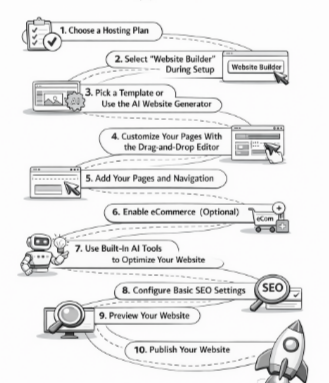
Creating a website with the Hostinger website builder is a fast and beginner-friendly process.
The platform is designed so anyone, regardless of technical skill, can go from idea to published website in just a few simple steps.
Below is a straightforward walkthrough to help readers understand how it works.
1. Choose a Hosting Plan
To get started, select one of Hostinger’s Website Builder plans. Both Premium and Business Website Builder plans include the builder tool, hosting, templates, and AI features.
After purchasing, you’ll be guided directly into the setup process.
2. Select “Website Builder” During Setup
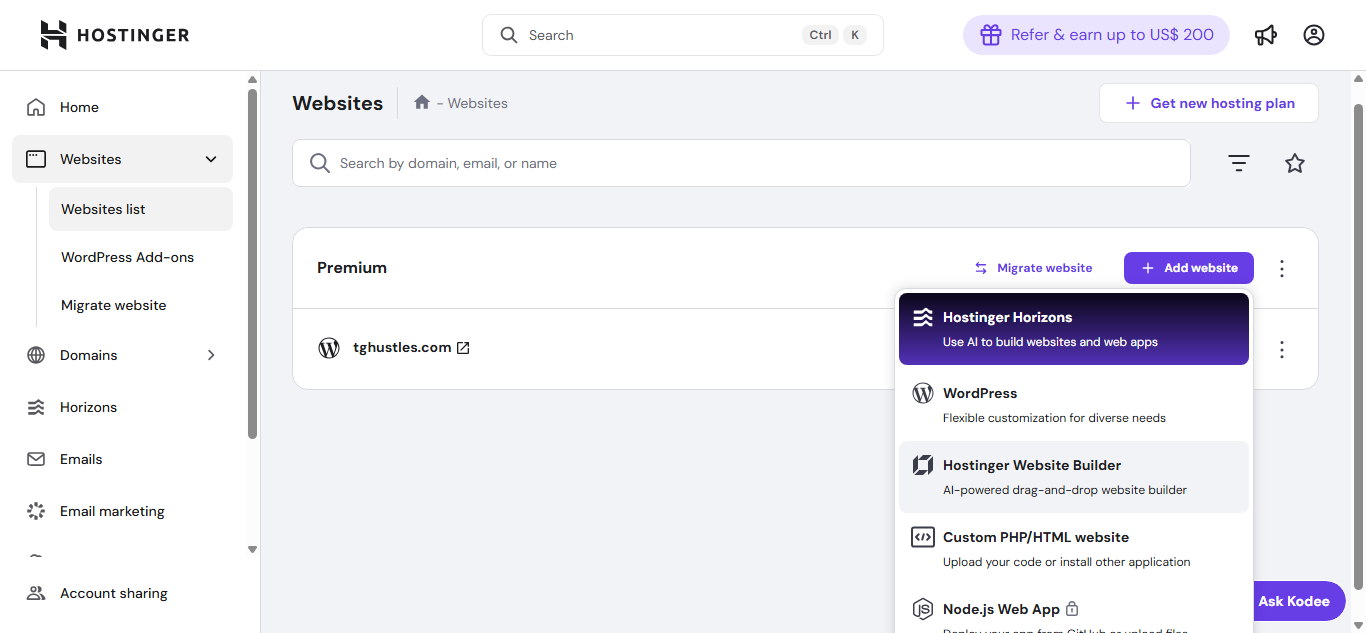
Once you access your Hostinger dashboard, you’ll be prompted to choose how you want to build your site.
Select the Website Builder option.
From here, Hostinger will transition you into the dedicated builder interface.
3. Pick a Template or Use the AI Website Generator
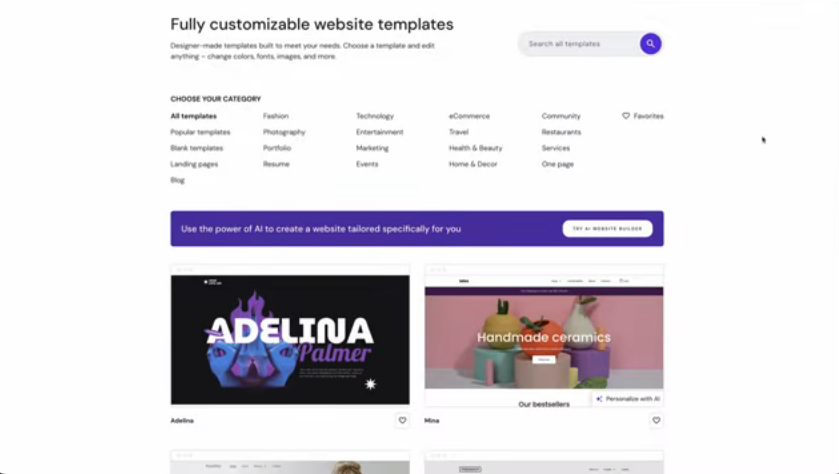
You can either:
- Choose a professionally designed template from categories like business, eCommerce, portfolio, or personal sites, or
- Use the AI Website Generator to automatically create a website based on your answers to a few questions.
Both options give you a strong starting point and eliminate the need for coding.
4. Customize Your Pages With the Drag-and-Drop Editor
Inside the editor, you can add and rearrange elements such as text, images, buttons, forms, and sections.
The interface works visually, if you want something moved, you simply drag it to a new location. You can also change fonts, colors, spacing, backgrounds, and layout styles.
5. Add Your Pages and Navigation
Most sites include common pages like Home, About, Services, Blog, and Contact.
The Hostinger website builder allows you to add or remove pages with one click and customize your navigation menu for a clean, user-friendly structure.
6. Enable eCommerce (Optional)

If you want to sell online, turn on the Online Store option.
You can add products, set prices, upload images, configure shipping, and connect payment methods, all from inside the builder.
7. Use Built-In AI Tools to Optimize Your Website
The builder includes multiple AI features that streamline your workflow:
- AI Writer for generating page text
- AI Heatmap to predict visitor behavior
- AI Logo Maker to create branding elements
These tools help you refine your website without external apps or professional support.
8. Configure Basic SEO Settings
Before publishing, edit your SEO settings:
- Meta titles
- Meta descriptions
- URL slugs
- Image alt tags
- Mobile preview
Completing these steps helps your site rank better on Google from day one.
9. Preview Your Website
Use the preview feature to see how your website looks on desktop, tablet, and mobile.
Make small adjustments if needed to ensure a consistent experience across devices.
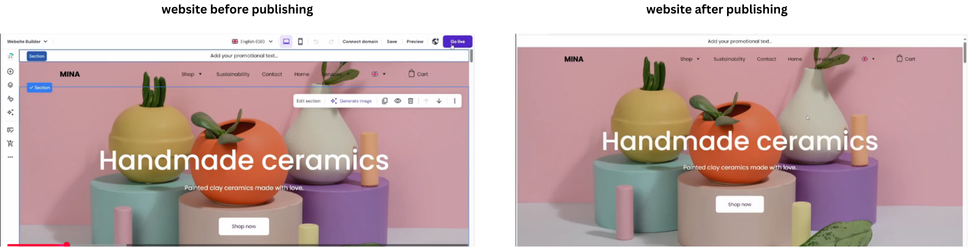
10. Publish Your Website
Once you’re satisfied, click Publish.
Your site will go live instantly, and you can update it anytime from your Hostinger dashboard with no downtime.
Final Verdict: Is the Hostinger Website Builder Worth It?
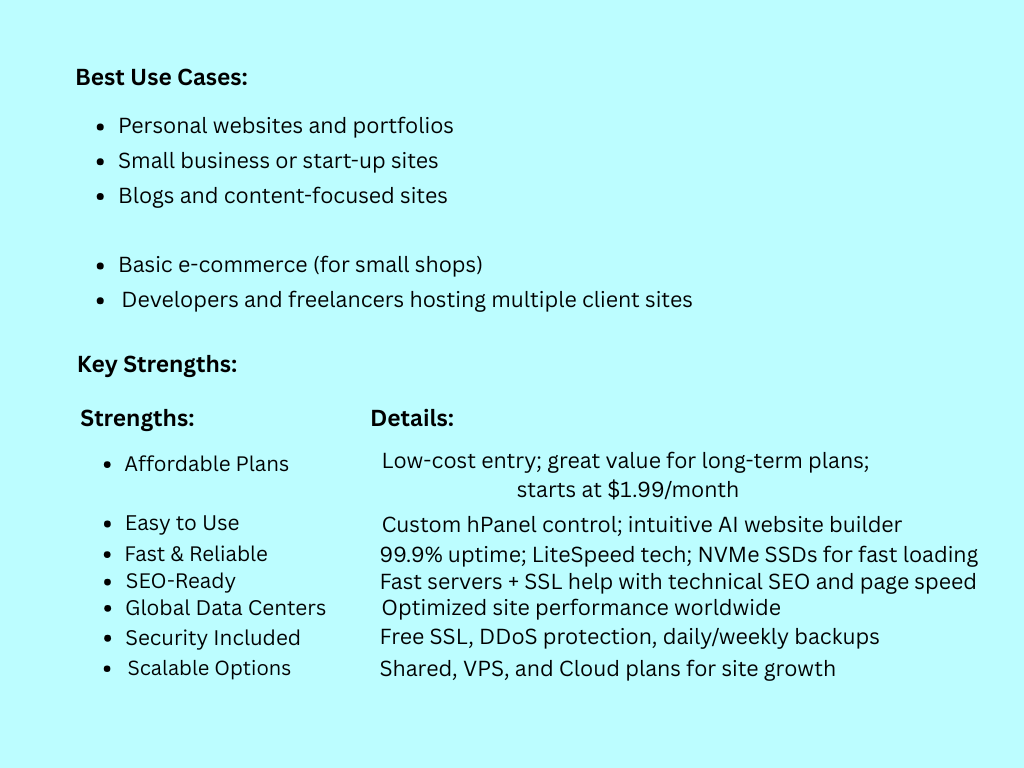
After exploring its features, pricing, ease of use, and competitive position, the Hostinger website builder stands out as a strong choice for many users, especially those seeking an affordable, beginner-friendly platform without sacrificing essential tools.
For individuals and small business owners who want to launch a professional website quickly, the Hostinger website builder delivers.
Its intuitive drag-and-drop interface eliminates the need for coding skills, and the built-in AI tools, such as the AI writer, AI heatmap, and AI logo maker, help users optimize content and design without external resources.
Combined with modern, responsive templates and solid SEO settings, the platform makes it feasible to create an optimized presence that can perform well in search rankings.
Pricing is another strong advantage. When compared to competitors like Wix and Squarespace, Hostinger’s plans are notably affordable.
Even with renewal pricing factored in, users benefit from bundled hosting, a free domain (for the first year), and performance-enhancing infrastructure such as CDN support and SSL security.
The Hostinger website builder also supports eCommerce functionality that is well-suited for small to medium stores.
While it may not match the advanced commerce features of platforms like Shopify, it offers a practical solution for users who want to sell products without complex setups or third-party plugins.
With that said, the platform does have limitations.
Developers and advanced users who need deep customization or access to extensive third-party integrations may find platforms like WordPress or Shopify more appropriate.
Template switching can require adjustments, and larger online stores might outgrow the builder’s ecommerce scope.
In summary, the Hostinger website builder is worth it for:
- First-time website creators andbeginners
- Small businesses and personal brands
- Freelancers and creatives
- Small ecommerce operations
- Users who value simplicity, affordability, and speed
It may be less suitable for:
- Large ecommerce enterprises
- Users requiring highly custom development
- Projects with extensive third-party integration needs
Overall, if you’re looking for a cost-effective, straightforward, and capable solution to build a professional website with minimal technical overhead, the Hostinger website builder delivers strong value and practical performance.
Conclusion
The Hostinger website builder offers an affordable, beginner-friendly, and powerful solution for anyone looking to create a professional website quickly.
With its drag-and-drop editor, AI-powered tools, responsive templates, and built-in hosting, it simplifies the website creation process while maintaining performance and SEO capabilities.
Whether you’re a small business owner, freelancer, creative professional, or launching a personal brand, the Hostinger website builder provides all the essential tools to get your website online with minimal hassle.
If you’ve been waiting to build a website without dealing with complex setups or high costs, now is the perfect time. Start building your website today with the Hostinger website builder and bring your online presence to life.