The Wix website builder is one of the most popular platforms for creating websites quickly and easily, whether you’re a beginner, small business owner, blogger, or affiliate marketer.
With its intuitive drag-and-drop editor, hundreds of templates, and built-in tools for SEO, blogging, and eCommerce, Wix makes it simple to design a professional-looking website without any coding knowledge.
In this article, we’ll take an in-depth look at the Wix website builder, covering its key features, pricing plans, pros and cons, SEO tools, and who it’s best suited for.
By the end, you’ll have all the information needed to decide if the Wix website builder is the right choice for your website project.
Table of Contents
What Is the Wix Website Builder?
The Wix website builder is an all-in-one, cloud-based platform that allows beginners, small business owners, bloggers, and affiliate marketers to create a professional website without needing technical or coding skills.
It’s designed to make website creation simple, while still offering enough flexibility to build a site that looks polished and modern.
With the Wix website builder, everything you need is included in one place. Hosting, security, templates, and design tools are built in, so you don’t have to connect multiple services.
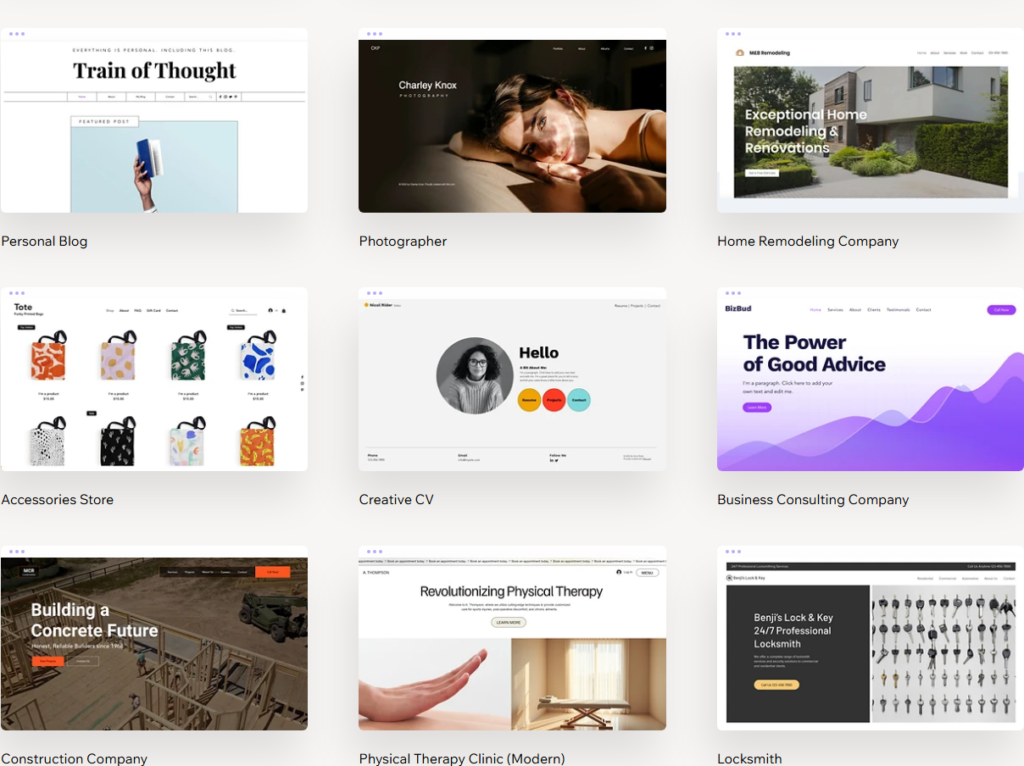
After signing up, you can choose from hundreds of pre-designed templates or use Wix’s AI-powered website generator to create a site automatically based on your answers to a few questions.
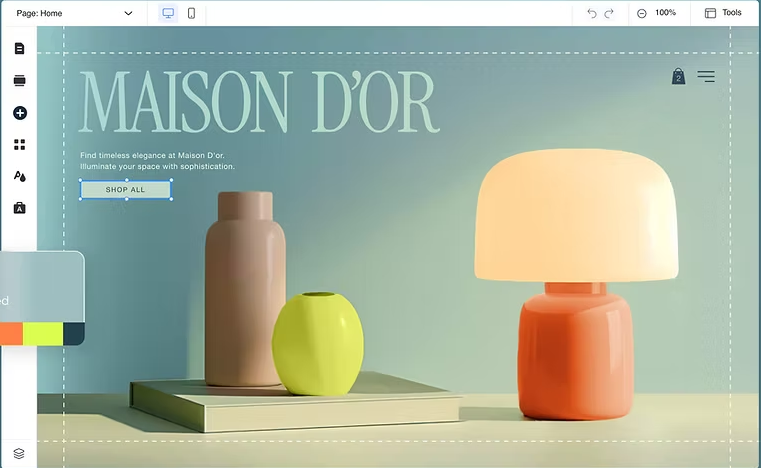
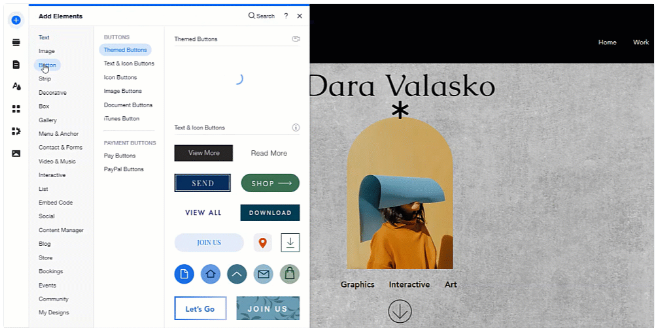
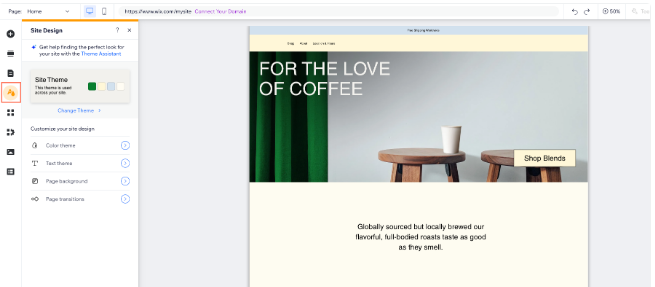
One of the biggest advantages of the Wix website builder is its drag-and-drop editor. You can easily move text, images, buttons, and other elements anywhere on the page, allowing you to customize your layout visually.
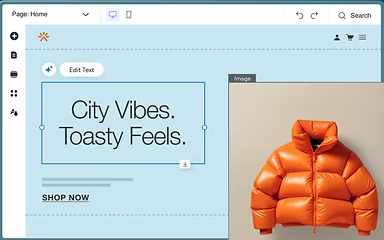
This makes Wix especially appealing to beginners who want full control over their design without dealing with complex settings.
The Wix website builder supports many different website types. Small business owners can create service pages, contact forms, and booking systems.
Bloggers and affiliate marketers can publish content, manage categories, and optimize posts for search engines.
Wix also offers eCommerce features for users who want to sell products or digital downloads.
Another key benefit of the Wix website builder is access to the Wix App Market.
This allows you to add extra functionality such as email marketing tools, live chat, social media integrations, and analytics, all without touching code.
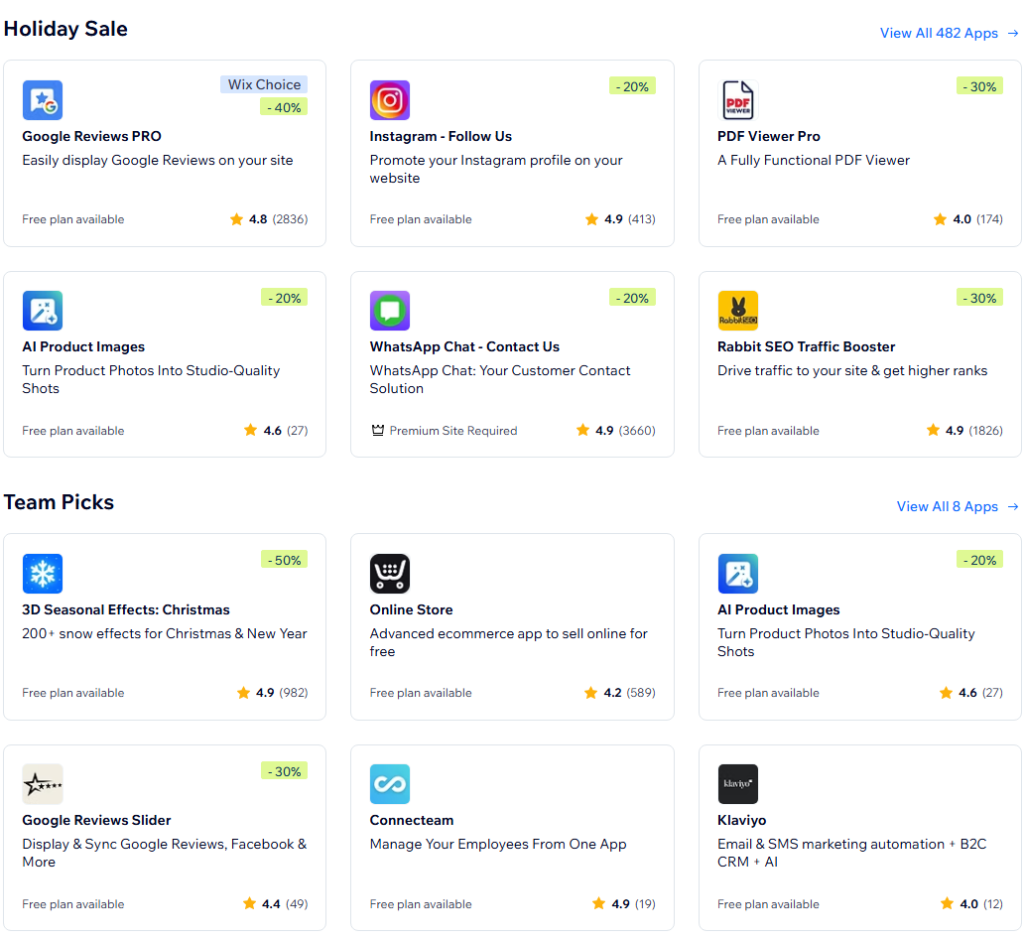
Overall, the Wix website builder is a beginner-friendly solution that combines ease of use, design flexibility, and built-in features.
It’s a strong option for anyone who wants to build and manage a website quickly while still having room to grow.
Key Features of the Wix Website Builder
The Wix website builder offers a wide range of features designed to help beginners, small business owners, bloggers, and affiliate marketers build and manage a professional website with ease.
Below are the key features that make Wix one of the most popular website-building platforms available today.
Drag-and-Drop Website Editor
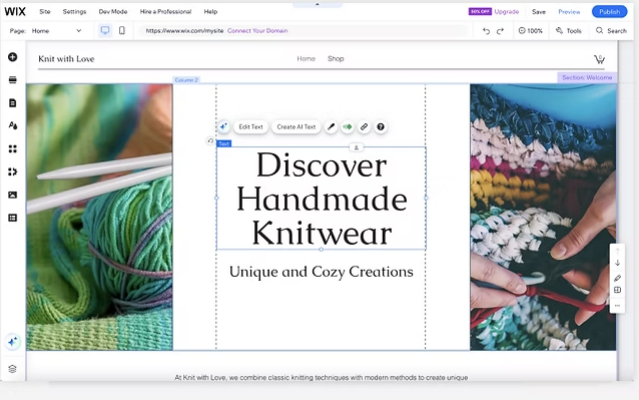
One of the most well-known features of the Wix website builder is its intuitive drag-and-drop editor.
You can add, move, resize, and customize elements such as text, images, buttons, and videos directly on the page.
This visual editing experience makes it easy for beginners to design a website without writing any code.
Professionally Designed Templates
The Wix website builder includes hundreds of professionally designed templates for different industries and website types.
These templates are optimized for mobile devices and cover use cases such as business websites, blogs, portfolios, and online stores.
Users can customize fonts, colors, and layouts to match their brand.
Blogging and Content Management Tools
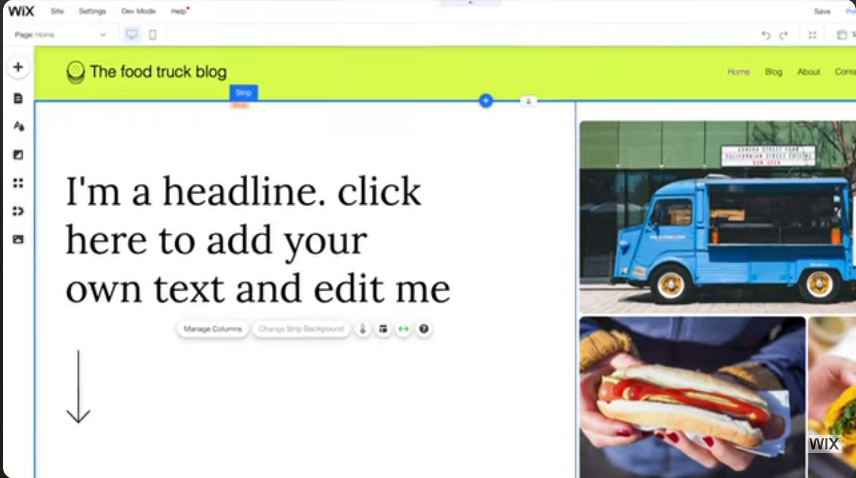
The Wix website builder includes built-in blogging tools that are ideal for bloggers and affiliate marketers.
You can create blog posts, organize categories, schedule content, and add images or videos easily.
Wix also supports SEO-friendly features like custom URLs and meta descriptions to help your content rank in search engines.
eCommerce and Online Selling Features
With the Wix website builder, users can create an online store to sell physical products, digital downloads, or services. Wix provides tools for product listings, payments, order management, and basic inventory tracking. This makes it a solid option for small businesses and affiliate marketers who want to monetize their websites.

Wix App Market
The Wix website builder gives users access to the Wix App Market, where you can add extra functionality to your site. Apps include email marketing tools, booking systems, live chat, social media integrations, and analytics. Most apps can be installed with just a few clicks.
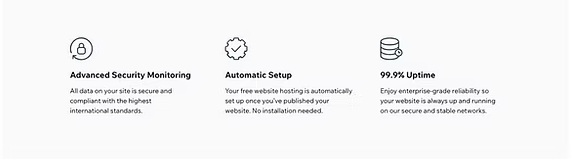
Hosting, Security, and Maintenance Included
Another major advantage of the Wix website builder is that hosting, security, and updates are included.
Wix handles server maintenance, SSL certificates, and platform updates automatically, allowing users to focus on building and growing their website instead of managing technical details.
Wix Website Builder Pricing Plans
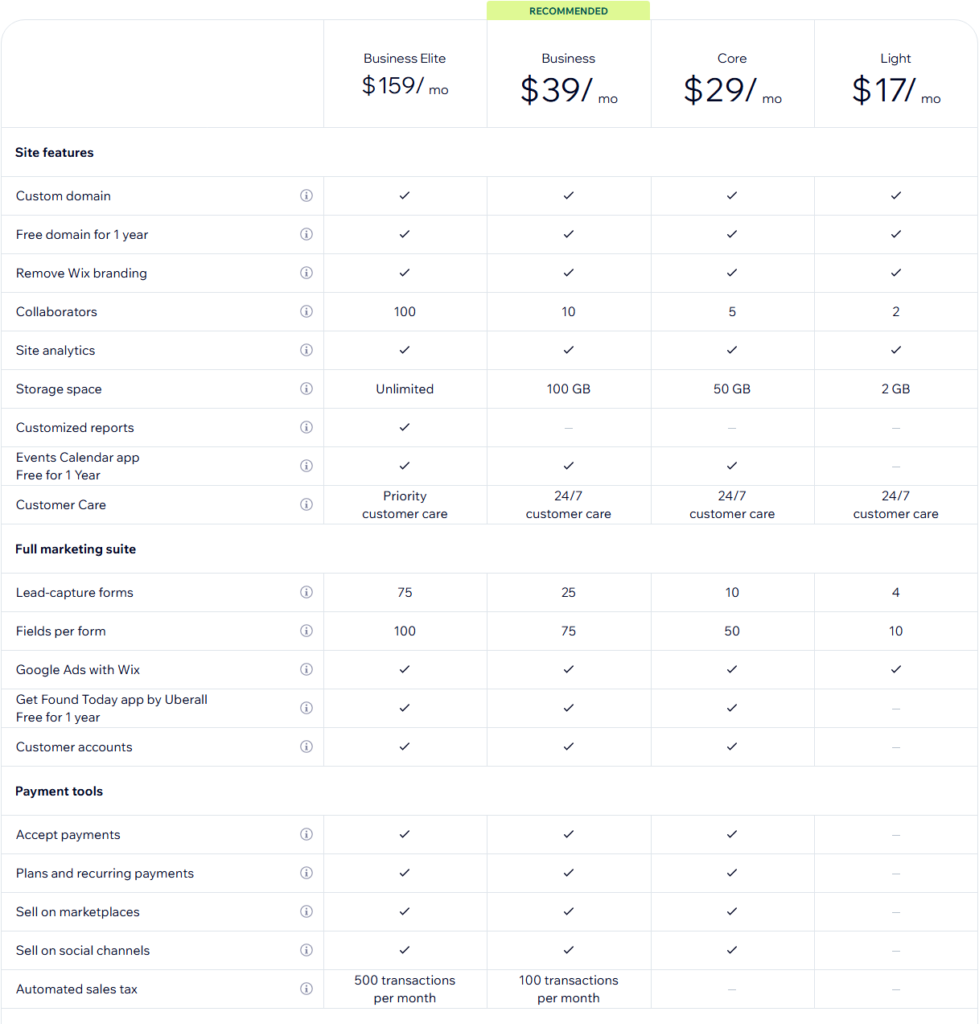
Understanding the pricing structure of the Wix website builder is essential before you commit to a plan. Wix offers a range of plans to suit different needs, from simple personal sites to fully featured business and eCommerce solutions. Each plan includes hosting, security, and access to the Wix editor, but the features and limits vary depending on the level you choose.
Free Plan (Basic Starter Option)
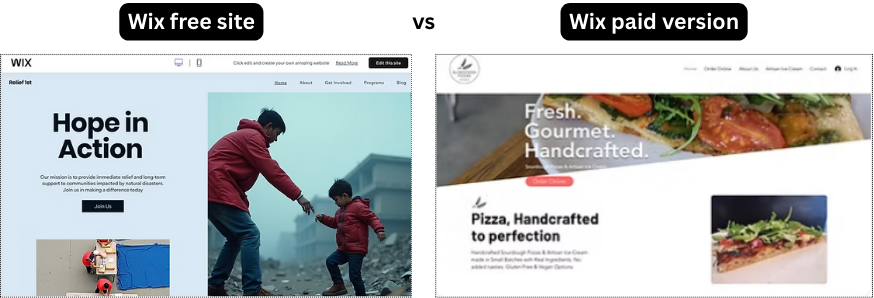
Wix provides a free plan that allows you to build and publish a website at no cost. This plan is useful for testing the platform, creating a personal project, or building a simple informational site.
- Uses a Wix-branded domain (e.g., username.wixsite.com/sitename)
- Displays Wix ads on your site
- Basic storage and bandwidth
- Access to templates and editor tools
The free plan is a good starting point for beginners but has limitations that may not work for businesses or professional brands.
Paid Website Plans
Wix offers several paid website plans designed for personal use or small business sites. Paid plans remove Wix ads, allow you to connect a custom domain, and increase storage and bandwidth limits.
Common website plans include:
- Combo: Suitable for personal sites and small portfolios
- Unlimited: Ideal for freelancers, bloggers, and small business websites
- Pro: Adds professional site features and branding tools
- VIP: Priority support and premium features
These plans differ in storage capacity, video hours, and advanced features. As you move up the pricing tiers, you get more resources and capabilities to support larger or more complex sites.
Business & eCommerce Plans
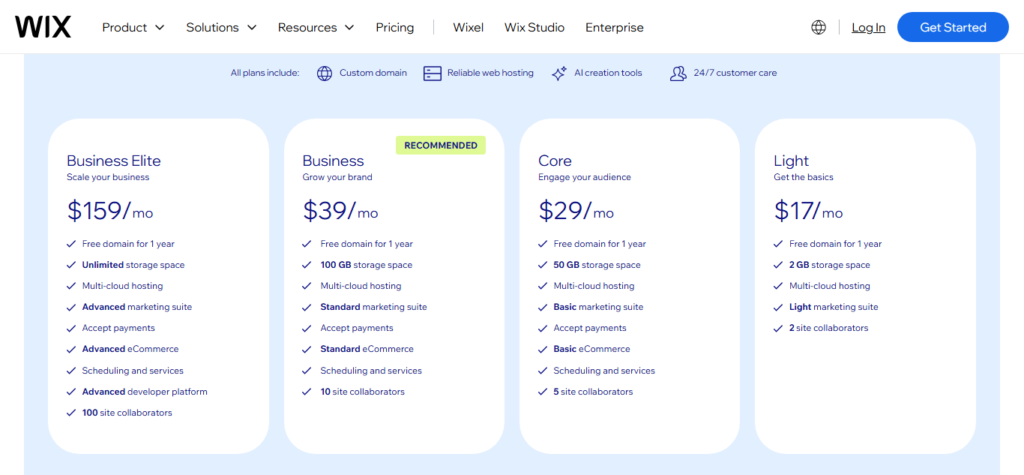
If you want to accept online payments, sell products, or manage bookings, you’ll need a business or eCommerce plan from the Wix website builder. These plans include everything from the regular website plans plus online selling tools.
Typical features of business/eCommerce plans:
- Accept credit card payments
- Unlimited bandwidth (on most plans)
- Online store capabilities
- Advanced commerce features (e.g., abandoned cart recovery, tax & shipping tools)
Business plans are designed for small business owners and entrepreneurs who need robust tools to run an online store or service-based website.
Key Pricing Considerations
When choosing a Wix website builder plan, consider the following:
- Custom Domain: Only available on paid plans
- Ads Removal: Paid plans remove Wix branding and ads
- Storage & Bandwidth: Higher plans offer more resources
- eCommerce Features: Only available on business/eCommerce tiers
Upgrading or downgrading plans is possible at any time, allowing you to scale your site as your needs change.
Pros and Cons of the Wix Website Builder
Evaluating the advantages and limitations of the Wix website builder helps beginners, small business owners, bloggers, and affiliate marketers decide whether it is the right platform for their needs. Below is a clear breakdown of the key pros and cons.
Pros of the Wix Website Builder
Easy to Use for Beginners
The Wix website builder features a visual drag-and-drop editor that allows users to design pages without coding knowledge. You can place elements exactly where you want them and see changes in real time.
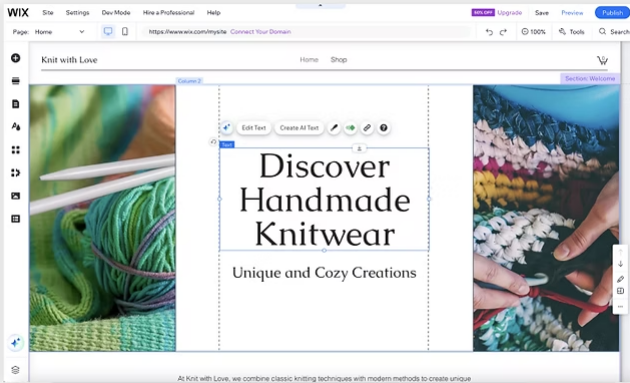
Wide Selection of Templates
Wix offers hundreds of professionally designed templates covering a variety of industries and use cases. These templates are a strong starting point for users who want a polished design without having to build from scratch.

All-in-one platform
With the Wix website builder, hosting, security, domain connection, and core features are included. This simplifies site management because you don’t need multiple third-party services.
Built-In SEO Tools
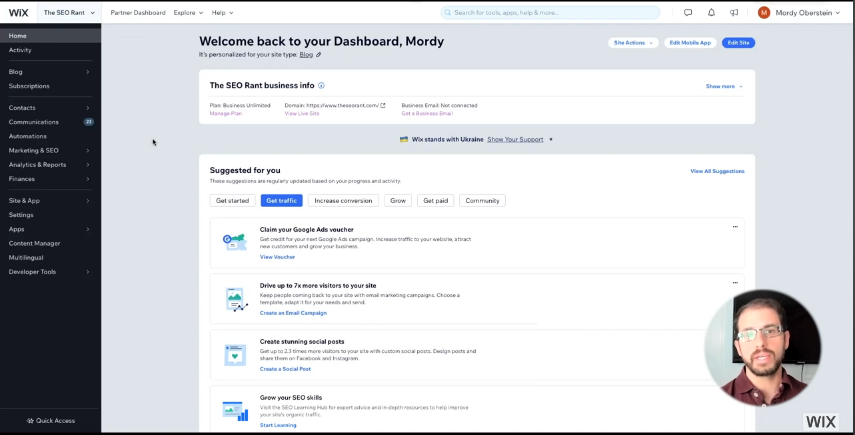
Wix includes SEO tools, like the Wix SEO Wiz, which guides users step-by-step in optimizing their site for search engines. This makes it easier for beginner site owners to improve visibility.
Flexible Features and Extensions
The Wix App Market provides add-ons for bookings, live chat, email marketing, and more. These extensions expand your site’s functionality without requiring plugins or custom code.
Cons of the Wix Website Builder
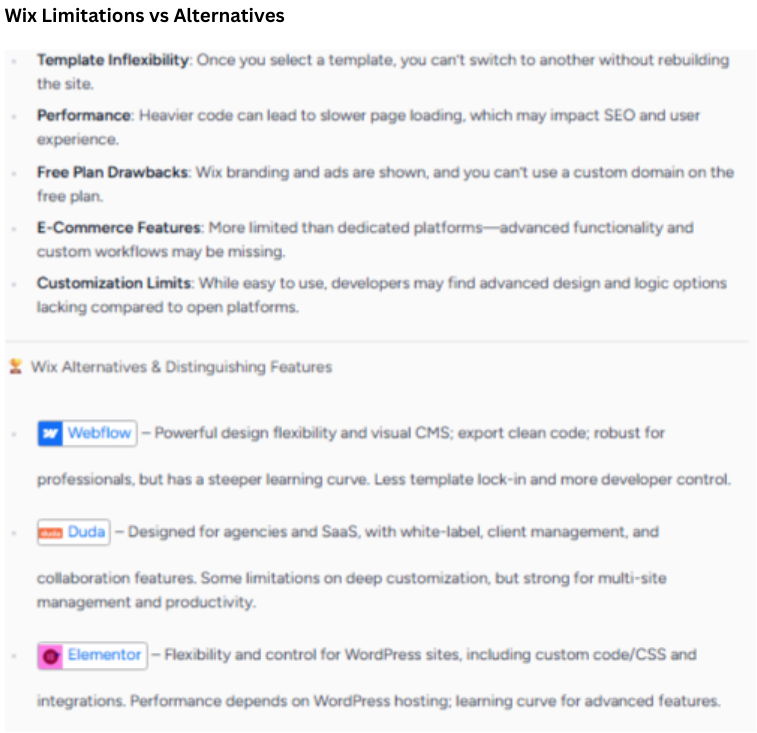
Template Lock-In
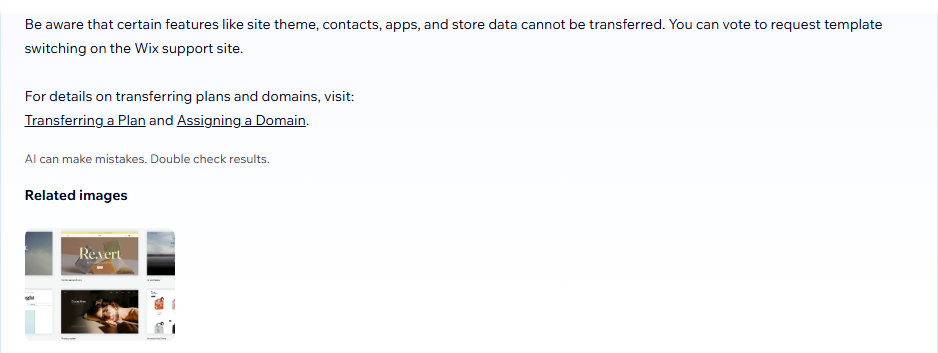
Once a site is published, you cannot switch to a different template without rebuilding the content. This limits flexibility if you want a completely new design later.
Limited Scalability
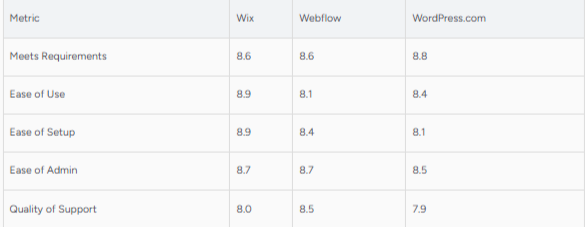
The Wix website builder is ideal for small to medium websites, but large or complex websites with custom requirements may find it limiting compared to open-source platforms like WordPress.
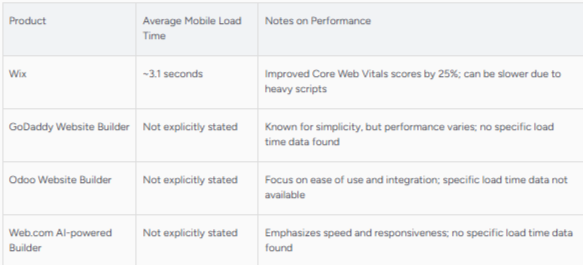
Performance Variability
Depending on how you build your site (heavy visuals, multiple apps), page load speeds can vary. Users who require highly optimized performance for SEO or eCommerce may need careful planning.
Advanced SEO Limitations
hile Wix offers strong basic SEO tools, some advanced users may find limitations in granular control compared to more customizable platforms.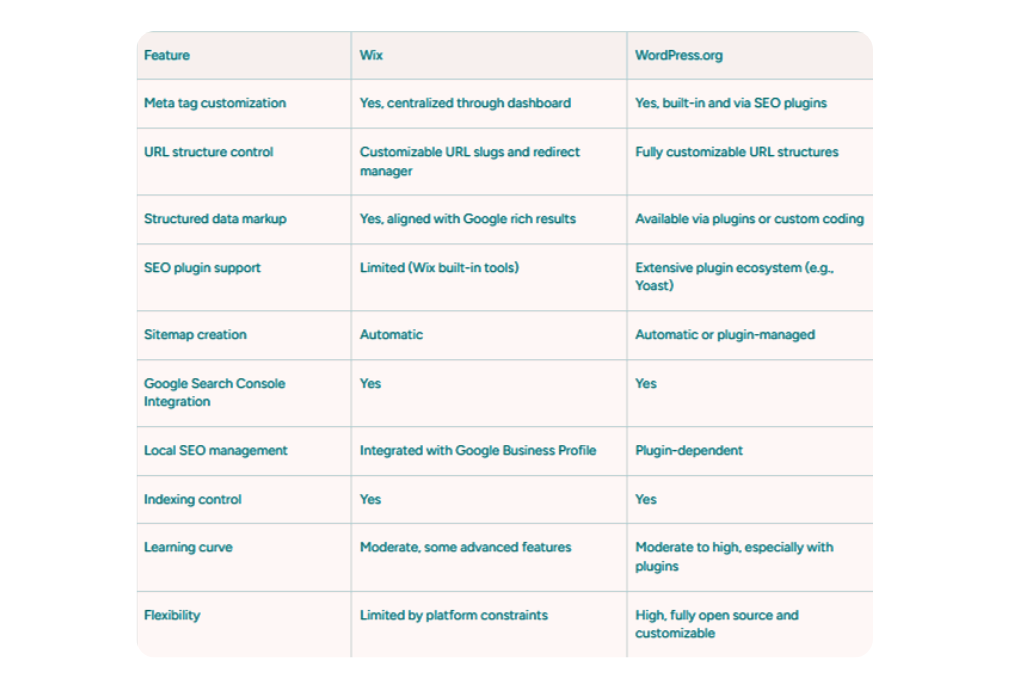
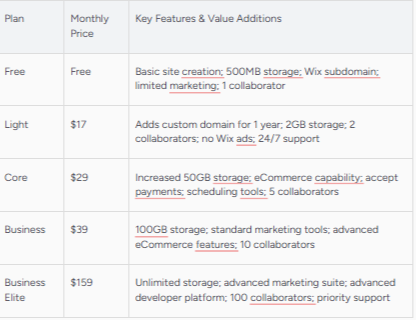
Cost Considerations for Growth
Higher-tier plans and add-ons can increase your cost as your site grows. Users should evaluate long-term pricing especially if advanced features are required.
Wix Website Builder SEO Features
The Wix website builder includes built-in SEO tools designed to help beginners, small business owners, bloggers, and affiliate marketers optimize their websites for search engines. While it’s not as complex as some advanced platforms, Wix provides all the essential SEO features needed to build a strong foundation and improve visibility in Google search results.
Wix SEO Wiz
The Wix website builder comes with Wix SEO Wiz, a guided SEO setup tool that walks users through the basics of search engine optimization. After answering a few questions about your website and goals, the tool creates a personalized SEO checklist.
Key benefits include:
- Step-by-step SEO guidance
- Automatic indexing setup
- Simple explanations for beginners

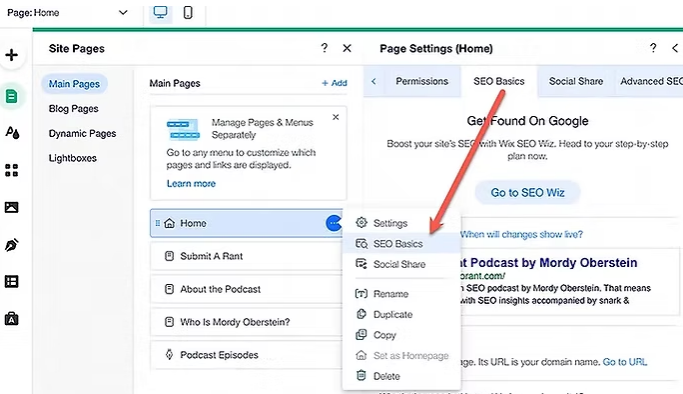
Custom Meta Titles and Descriptions
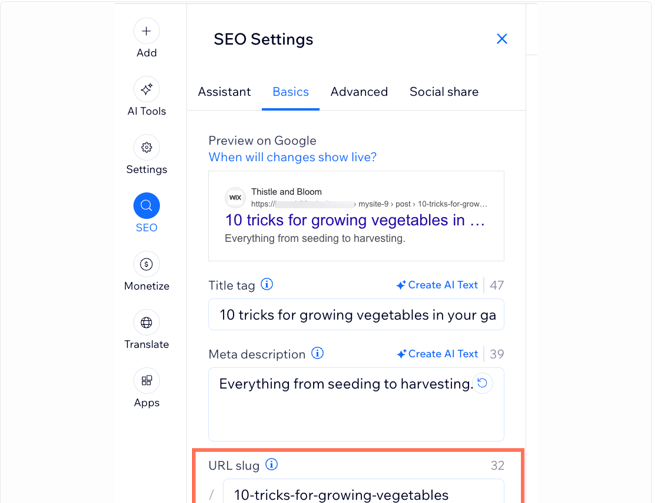
With the Wix website builder, you can easily edit meta titles and meta descriptions for individual pages. This helps search engines understand your content and improves click-through rates from search results.
You can:
- Customize SEO titles for each page
- Write optimized meta descriptions
- Preview how pages appear in Google search
SEO-Friendly URLs
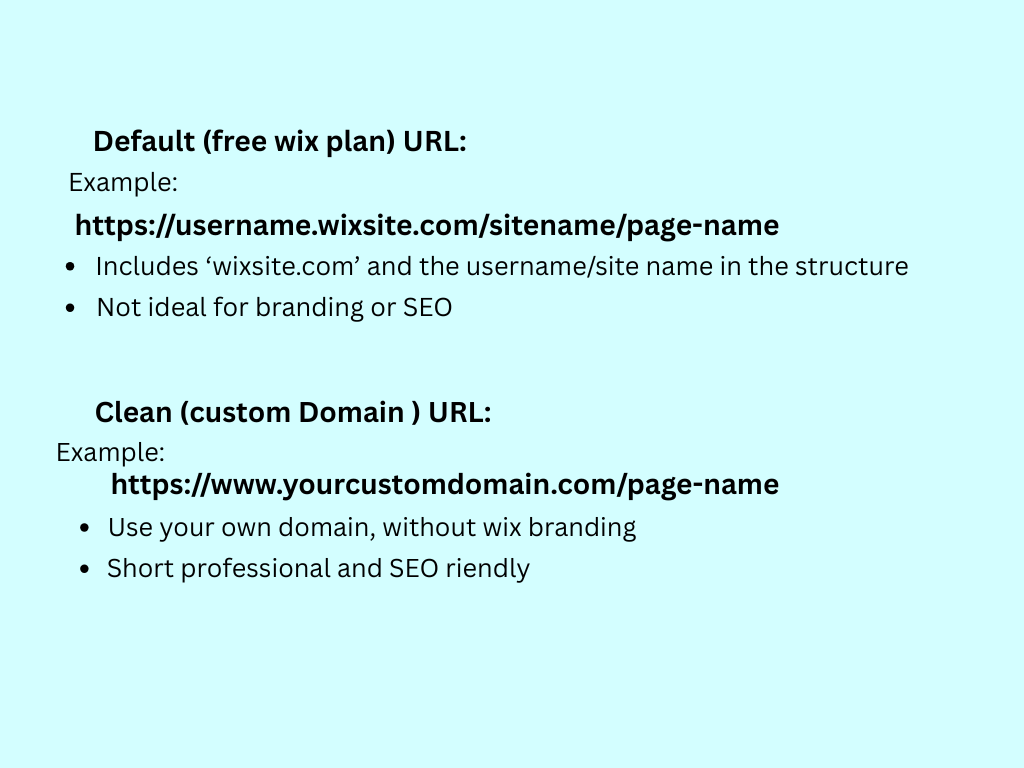
The Wix website builder allows users to customize page URLs, making them more search-engine friendly. Clean, readable URLs help both users and search engines understand what a page is about.
For example, you can:
- Remove unnecessary numbers or characters
- Add relevant keywords to URLs
- Create consistent URL structures
Mobile Optimization
Mobile-friendliness is a major ranking factor, and the Wix website builder automatically creates a mobile-responsive version of your site. You can also manually adjust the mobile layout to ensure the best user experience.
Mobile SEO features include:
- Mobile-responsive templates
- Separate mobile editor
- Optimized performance for mobile users

Page Speed and Performance Tools
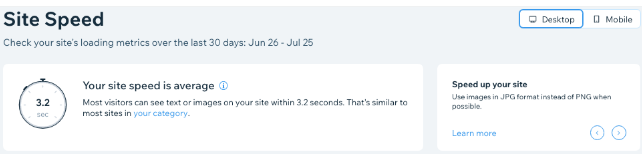
The Wix website builder handles many performance optimizations automatically, including hosting, image compression, and platform updates. While users don’t have full server-level control, Wix continuously improves site speed behind the scenes.
Best practices include:
- Optimizing images before upload
- Limiting excessive apps
- Using clean layouts for faster load times
Structured Data and Indexing
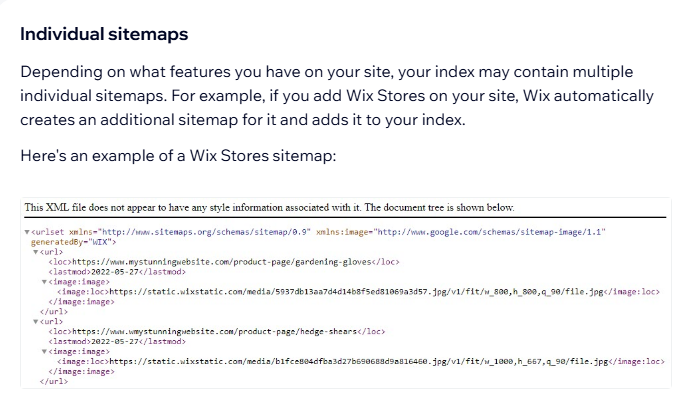
Wix automatically adds structured data markup for certain content types, such as blog posts and products. This helps search engines better understand your content and may improve how your pages appear in search results.
The Wix website builder also makes it easy to:
- Submit sitemaps automatically
- Enable indexing for pages
- Control noindex settings when needed
Blogging SEO Features
For bloggers and affiliate marketers, the Wix website builder includes SEO-friendly blogging tools. You can optimize blog posts with headings, internal links, images, and metadata, all within the editor.
SEO blogging features include:
- Category and tag organization
- Image alt text editing
- Easy internal linking
Who Is the Wix Website Builder Best For?
The Wix website builder is designed to serve a wide range of users, but it’s especially well-suited for people who want an easy, flexible, and all-in-one website solution. Below is a breakdown of who benefits most from using Wix and why.
Beginners with No Technical Experience
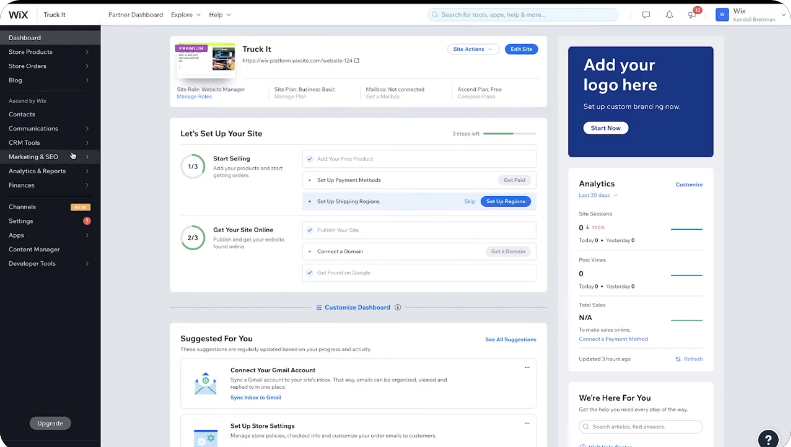
The Wix website builder is ideal for complete beginners who have never built a website before. Its drag-and-drop editor, pre-designed templates, and guided setup tools make it easy to launch a site without coding or technical knowledge.
Why beginners choose Wix:
- Simple visual editor
- No coding required
- Built-in hosting and security
- Guided setup with Wix ADI
Small Business Owners
Small business owners often choose the Wix website builder because it allows them to create professional websites quickly while keeping costs manageable. Wix supports service pages, contact forms, booking systems, and basic eCommerce features—all from one dashboard.
Best use cases for small businesses:
- Local service websites
- Appointment-based businesses
- Restaurants, salons, and consultants
- Small online stores

Bloggers and Content Creators
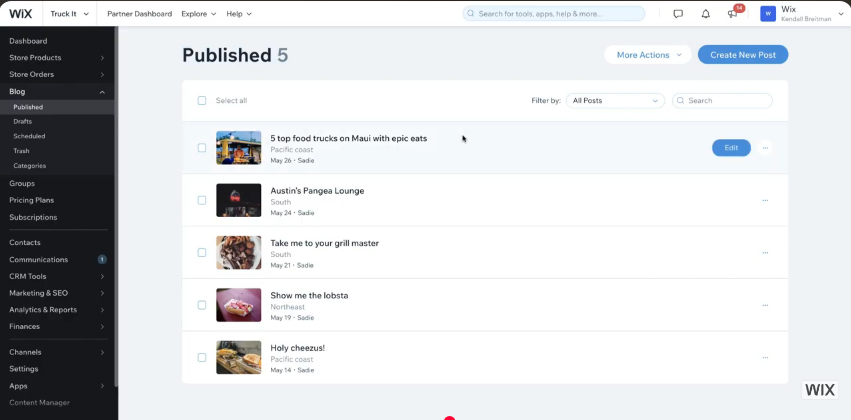
The Wix website builder works well for bloggers who want a clean design and built-in content tools. Users can create blog posts, organize categories, optimize content for SEO, and manage media easily.
Why bloggers like Wix:
- Built-in blogging platform
- SEO-friendly post settings
- Easy image and media management
- Mobile-optimized layouts
Affiliate Marketers
Affiliate marketers benefit from the Wix website builder because it allows them to publish content quickly and manage affiliate links with ease.
Wix supports SEO settings, internal linking, and content organization, which are essential for affiliate-focused websites.
Ideal for affiliate sites that:
- Focus on content and reviews
- Don’t require heavy customization
- Prioritize ease of use over complexity

Freelancers and Creative Professionals
Freelancers, designers, photographers, and creatives often use the Wix website builder to showcase portfolios. Wix’s visual design flexibility allows creative users to build unique layouts that highlight their work.
Popular use cases:
- Portfolio websites
- Personal brand sites
- Resume-style websites

When the Wix Website Builder May Not Be the Best Fit
While the Wix website builder is powerful, it may not be ideal for users who need:
- Advanced custom development
- Full control over server settings
- Large-scale or highly complex websites
In these cases, more customizable platforms may be a better option.
Wix Website Builder vs Other Platforms
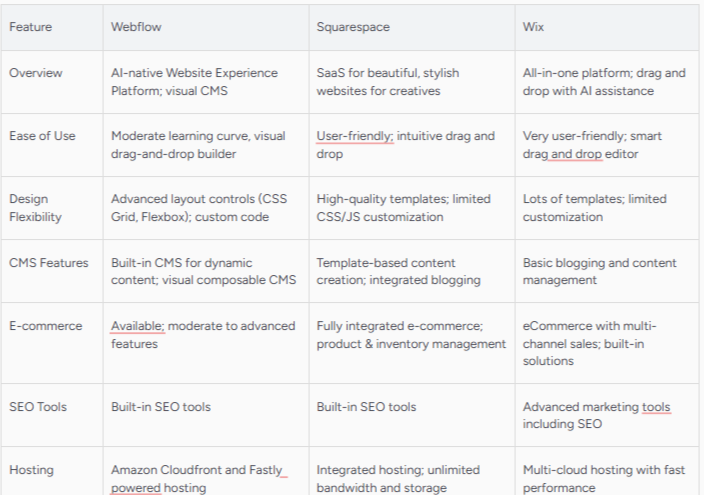
When choosing a website platform, it’s helpful to see how the Wix website builder compares to other popular options. Below is a clear, side-by-side style comparison to help beginners, small business owners, bloggers, and affiliate marketers decide which platform best fits their needs.
Wix Website Builder vs WordPress
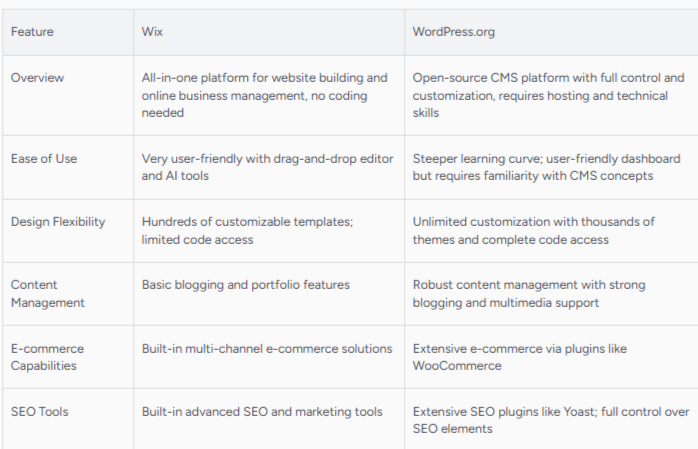
The Wix website builder and WordPress are often compared, but they serve different types of users.
Wix Website Builder
- Beginner-friendly and easy to use
- Drag-and-drop visual editor
- Hosting, security, and updates included
- Minimal setup and maintenance
WordPress
- Requires hosting, themes, and plugins
- More customization and flexibility
- Steeper learning curve
- Better for large or complex websites
Best choice:
- Choose Wix if you want simplicity and fast setup
- Choose WordPress if you want full control and scalability
Wix Website Builder vs Squarespace
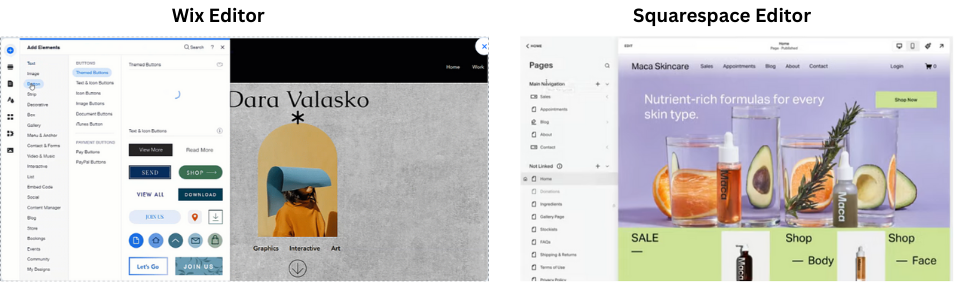
Both platforms focus on design and ease of use, but they differ in flexibility.
Wix Website Builder
- More design freedom with drag-and-drop editing
- Larger app marketplace
Squarespace
- Sleek, design-focused templates
- More structured editor
- Fewer third-party integrations
Best choice:
- Choose Wix for flexibility and customization
- Choose Squarespace for minimal, design-first layouts
Wix Website Builder vs Shopify
This comparison is important for users interested in selling online.
Wix Website Builder
- Good for small to medium online stores
- Easier setup for beginners
- All-in-one website + store solution
Shopify
- Built specifically for eCommerce
- Advanced inventory and sales tools
- Higher learning curve and cost
Best choice:
- Choose Wix for simple stores or mixed content sites
- Choose Shopify for large-scale or eCommerce-only businesses

Wix Website Builder vs All-in-One Marketing Platforms
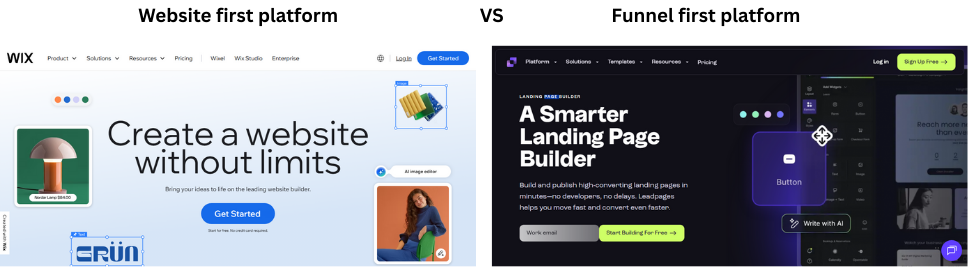
Some users compare Wix to platforms that focus on funnels and automation.
Wix Website Builder
- Website-first platform
- Strong design and content tools
- Add marketing features via apps
Marketing-focused platforms
- Built for funnels, email automation, and sales flows
- Less design flexibility
- Often more complex for beginners
Best choice:
- Choose Wix if your main goal is content and branding
- Choose a marketing platform if automation is your priority
Summary: Which Platform Should You Choose?
The Wix website builder stands out for users who want:
- Ease of use
- Visual design control
- Built-in hosting and security
- Quick setup without technical hassle
It may not replace advanced platforms for large-scale projects, but for beginners, small businesses, bloggers, and affiliate marketers, Wix offers an excellent balance of simplicity and functionality.
Is the Wix Website Builder Worth It?
Deciding whether the Wix website builder is worth using depends on your goals, technical experience, and the type of website you want to create. This section breaks down key considerations to help you determine if Wix is the right choice for your project.
Overall Value for Beginners
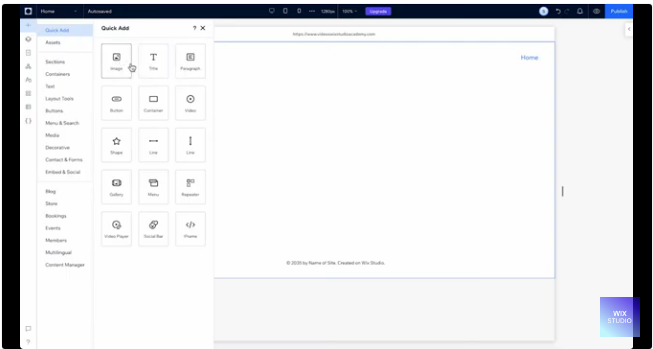
For individuals who are new to website creation, the Wix website builder offers significant value. Its intuitive drag-and-drop editor, ready-made templates, and guided setup tools reduce the learning curve. With Wix, you can go from zero to a live website quickly without needing coding skills or technical expertise.
Why Wix is worth it for beginners:
- No coding required
- All-in-one platform (hosting, security, editor)
- Easy setup and publishing
Value for Small Business Owners
Small business owners often need an online presence that is both professional and cost-effective. The Wix website builder provides tools for service pages, contact forms, appointment booking, and even eCommerce. Many small business sites can be built, published, and maintained with minimal ongoing costs.
Why Wix is worth it for small businesses:
- Professional templates tailored to business needs
- Built-in tools for services and customer interaction
- Affordable paid plans with scalable features

Value for Bloggers and Affiliate Marketers
Bloggers and affiliate marketers benefit from Wix’s content management tools and SEO features.
The platform lets you publish posts, manage categories, and optimize pages for search engines.
While not as advanced as some blogging-only platforms, Wix is capable enough for most content-driven sites.
Why Wix is worth it for bloggers and affiliate marketers:
- Simple blog creation and scheduling
- SEO tools that support better visibility
- Easy internal linking and media management
Value for Online Stores
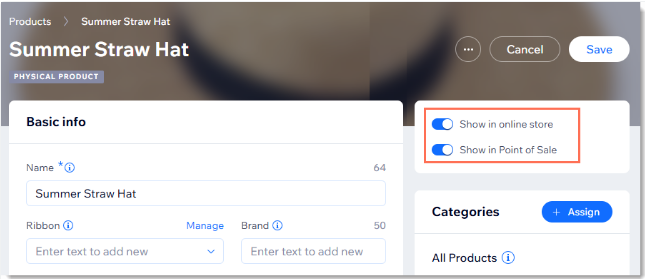
The Wix website builder includes eCommerce capabilities suitable for small to medium-sized online stores.
You can list products, manage orders, accept payments, and customize your storefront.
However, for large-scale or highly complex stores, dedicated eCommerce platforms may offer more advanced tools.
Why Wix is worth it for online stores:
- Basic to mid-level store functionality included
- Easy product setup and payment integration
- Works well for small merchants
When Wix Might Not Be Worth It
While the Wix website builder delivers strong value for many users, it might not be worth it in the following scenarios:
- You need advanced custom development: Wix has limitations compared to open platforms like WordPress or custom-coded solutions.
- High-performance requirements: Very large sites with complex functionality may outgrow Wix’s structure.
- Strong SEO control needed: While Wix offers essential SEO tools, power users may prefer platforms with deeper customization.
Final Verdict
The Wix website builder is worth it for most users who want a simple, flexible, and all-in-one solution for building a website.
It stands out for ease of use, design freedom, and quick deployment. For beginners, small businesses, bloggers, and many affiliate marketers, Wix strikes the right balance between functionality and accessibility.
If your project requires extreme customization, complex backend systems, or advanced SEO control, exploring more flexible platforms may be worthwhile.
Conclusion
Final Thoughts on the Wix Website Builder
The Wix website builder is a powerful, beginner-friendly platform that allows users to create professional websites quickly and easily.
It combines a visual drag-and-drop editor, hundreds of customizable templates, SEO tools, blogging capabilities, and eCommerce functionality, all in one platform.
Hosting, security, and platform updates are included, making website management simple and hassle-free.
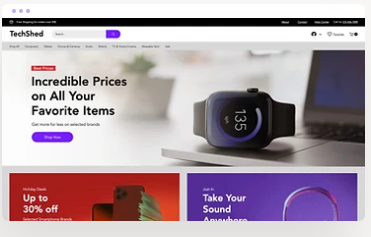
Whether you are a small business owner, blogger, affiliate marketer, or freelancer, the Wix website builder provides the tools needed to build a polished, functional, and visually appealing website without technical expertise.
However, for very large or complex websites requiring advanced customization and full backend control, other platforms may be more suitable.
Still, for most beginners and small-to-medium websites, the Wix website builder offers excellent value and flexibility.
Recommendation
If you’re looking for an easy-to-use, all-in-one solution to build your website with minimal setup, the Wix website builder is worth trying.
Its combination of design freedom, built-in features, and scalability for small sites makes it an ideal choice for those who want a professional website without the complexity of traditional platforms.