
Creating a professional website has never been easier thanks to the Squarespace website builder.
Designed for beginners, creatives, and small business owners, Squarespace combines sleek templates, intuitive design tools, and built-in features in one all-in-one platform.
In this guide, we’ll explore everything you need to know about the Squarespace website builder, including its key features, pricing, pros and cons, and whether it’s the right choice for your website.
Contents
What Is the Squarespace Website Builder?
The Squarespace website builder is an all-in-one platform that allows individuals and businesses to create professional websites without needing coding or technical expertise.
It combines website design, hosting, content management, and built-in tools into a single system, making it especially appealing to beginners and non-technical users.
At its core, the Squarespace website builder works through a visual, section-based editor.
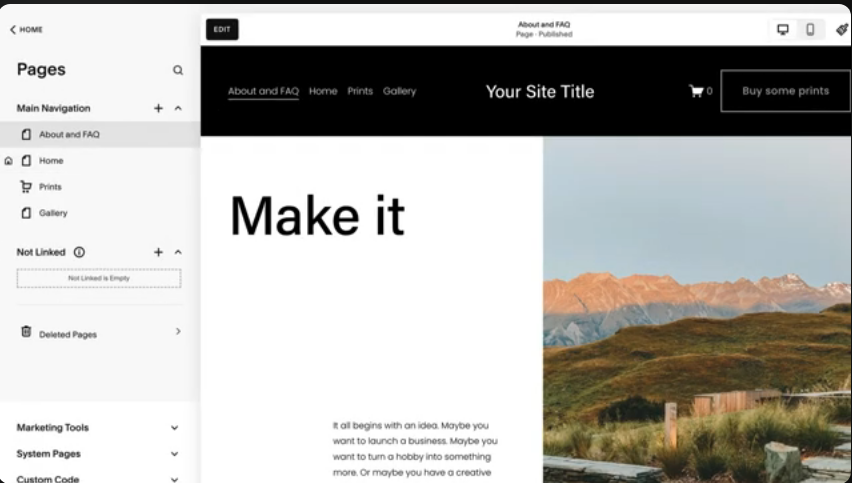
Users can choose from professionally designed templates and customize layouts, colors, fonts, and content using simple drag-and-drop controls.
This approach enables you to see changes in real time, which significantly reduces the learning curve compared to traditional website development.
Squarespace is designed to support a wide range of website types, including:
- Business websites
- Blogs and content sites
- Online portfolios
- Ecommerce stores
- Personal and professional landing pages

Unlike open-source platforms, Squarespace handles hosting, security, updates, and performance optimization automatically.
This means users can focus on building and managing their website rather than dealing with technical maintenance.
The Squarespace website builder also includes built-in tools for blogging, ecommerce, SEO, analytics, and email marketing.
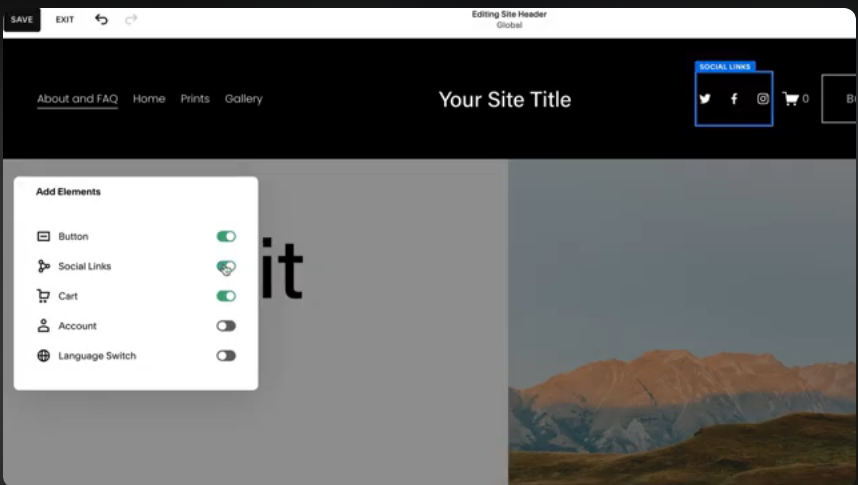
Because these features are native to the platform, there is no need to install third-party plugins to launch a fully functional website.
Key Features of the Squarespace Website Builder
The Squarespace website builder includes a robust set of built-in features designed to help users create visually appealing, functional, and scalable websites.
Below are the most important features that make Squarespace a popular choice for individuals and small businesses.
Drag-and-Drop Visual Editor
The Squarespace website builder uses a section-based, drag-and-drop editor that allows users to add, remove, and rearrange content with ease.
You can insert text, images, galleries, videos, forms, and buttons without touching any code.
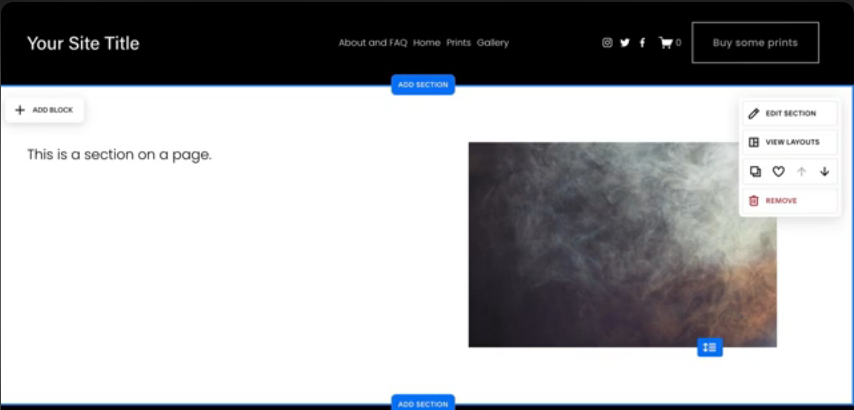
Changes are visible in real time, making the design process straightforward and beginner-friendly.
Professional Templates and Design Flexibility
Squarespace is known for its high-quality, professionally designed templates.
These templates are fully responsive, meaning your website automatically looks good on desktop, tablet, and mobile devices.

Users can customize fonts, colors, layouts, and spacing to match their brand while maintaining a clean, modern design.
Built-In Blogging Tools
The Squarespace website builder includes powerful blogging features such as post scheduling, categories, tags, and multi-author support.

You can easily add images, videos, and custom layouts to blog posts, making it suitable for content creators who want a polished, professional look.
Ecommerce Functionality
Squarespace allows users to create fully functional online stores directly within the platform.
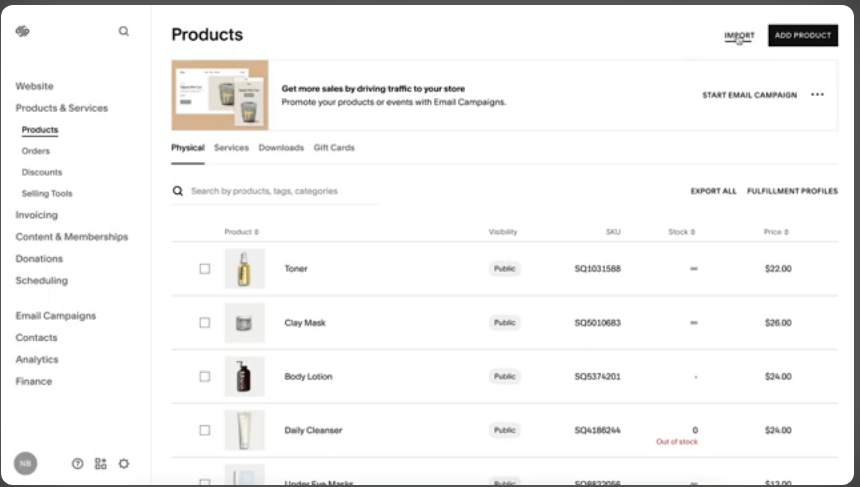
Features include product management, inventory tracking, secure checkout, digital and physical product support, and customer accounts.
This makes the Squarespace website builder a strong option for small to medium-sized e-commerce businesses.

Built-In SEO Tools
The Squarespace website builder comes with built-in SEO features that help improve search engine visibility.
Users can customize page titles, meta descriptions, URLs, and image alt text.
The platform also generates clean URLs and includes automatic sitemaps to help search engines index your site more effectively.

Integrated Analytics and Reporting
Squarespace provides built-in analytics that track traffic, visitor behavior, and content performance.
Users can view key metrics such as page views, traffic sources, and popular content without needing external tools.
This helps website owners make data-driven decisions to improve their site.

Security, Hosting, and Maintenance
With the Squarespace website builder, hosting, security, and updates are handled automatically.
All websites include SSL certificates, reliable hosting, and ongoing platform updates.
This removes the need for manual maintenance and ensures your website remains secure and stable.

These features collectively make the Squarespace website builder a comprehensive solution for users who want a professional website without the complexity of managing multiple tools or technical components.
Squarespace Website Builder Pricing
Understanding the pricing structure of the Squarespace website builder is essential before you commit to building your site.
Squarespace offers multiple subscription tiers tailored to different needs, from personal sites to advanced ecommerce stores.
Each plan includes hosting, templates, security, and access to the visual editor, meaning you get an all-in-one website solution rather than managing separate services.
Below is a breakdown of the core pricing plans, how they differ, and what type of user each plan is best suited for.
All prices listed are based on annual billing, which is significantly cheaper per month than paying month-to-month.
Squarespace also offers a 14-day free trial so you can test the platform before paying.
Pricing Plans Overview
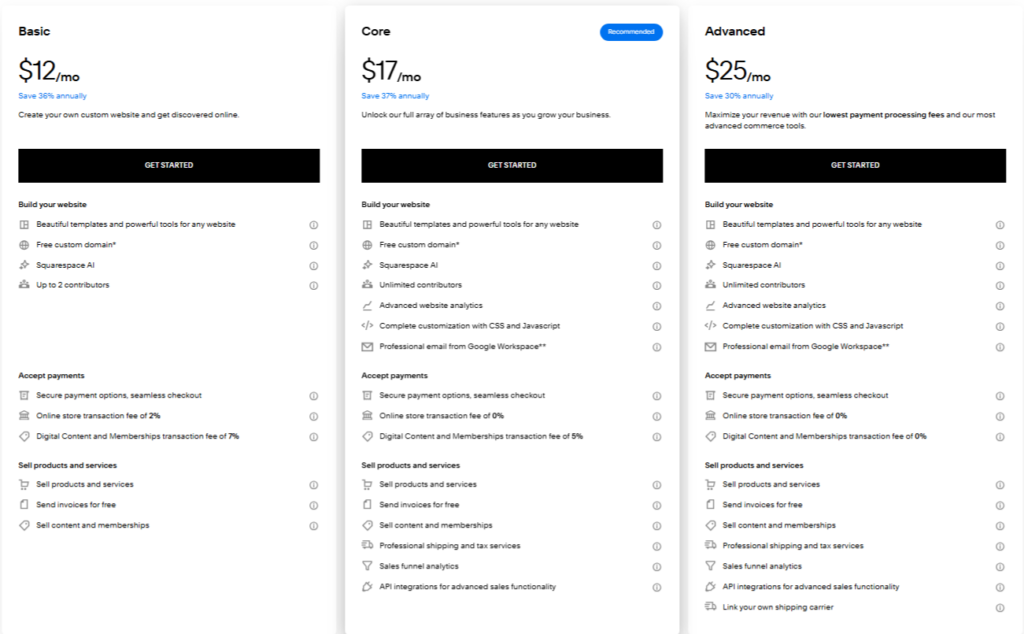
Here’s what you need to know about each plan:
Basic Plan
The Basic plan is the most affordable entry point for the Squarespace website builder.
It gives you access to the core site-building tools, including templates, the drag-and-drop editor, and essential website hosting services.

This plan is suitable for personal websites, portfolios, blogs, or simple small business sites that do not need advanced ecommerce capabilities.
Core Plan
The Core plan adds several enhancements over Basic, making it a good choice for small businesses.
It includes professional email with Google Workspace, advanced analytics to track visitor behavior, and promotional pop-ups and banners.

This plan also supports e-commerce functionality, though transaction fees may apply depending on your setup.
Plus Plan
The Plus plan is designed for growing online stores.
In addition to everything in the Core plan, it eliminates Squarespace’s transaction fees and allows features like customer accounts and point-of-sale systems.
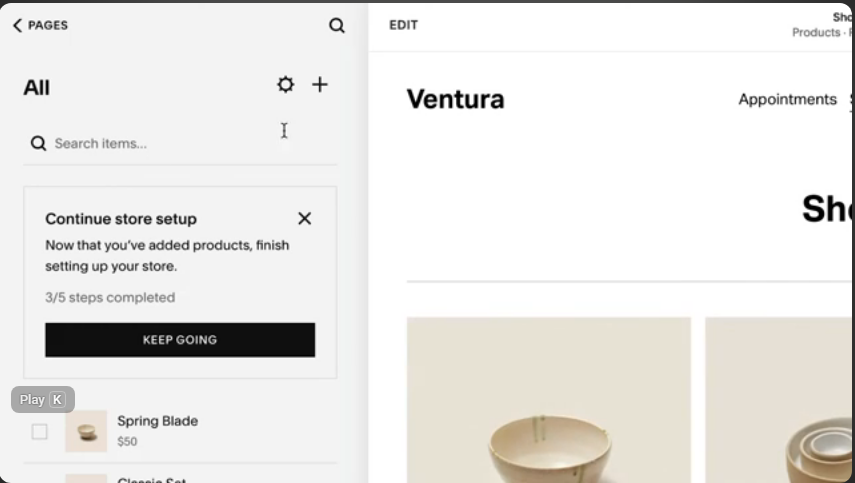
This makes it a solid option for e-commerce businesses that are ready to expand beyond basic sales.
Advanced Plan
The Advanced plan is aimed at larger e-commerce operations.
It includes all Plus features plus tools for abandoned cart recovery, advanced shipping options, and subscription product management.
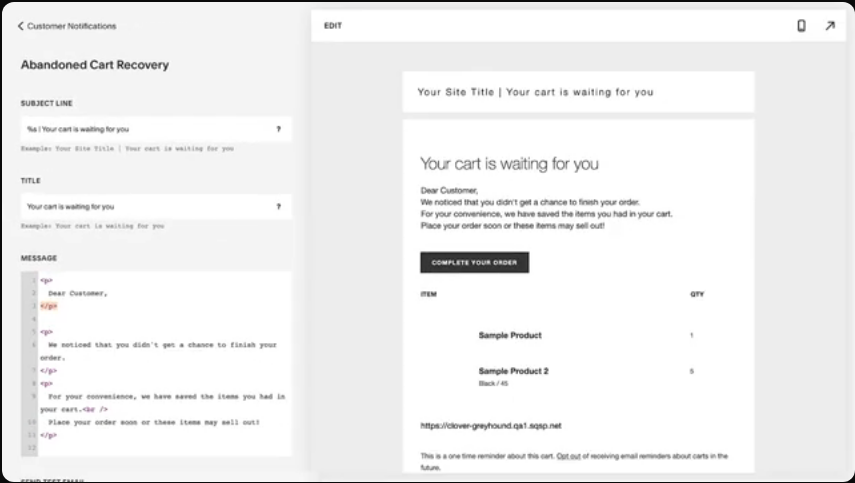
This tier is ideal if your business has high sales volume or needs sophisticated store automation features.
Additional Costs to Consider
While the Squarespace website builder includes hosting and core features, you should be aware of potential extra costs:
- Domain registration: The first year is typically free with annual billing, but renewal fees apply afterward (often around $20–$30 per year).
- Email hosting: Google Workspace or other email services may incur separate fees.
- Third-party integrations: Premium plugins or marketing tools may have additional costs.
Summary:
The Squarespace website builder’s pricing structure is designed to grow with you.
From affordable entry-level options for individuals and small sites to powerful e-commerce-focused plans for larger businesses, you can choose the tier that matches your goals and budget.
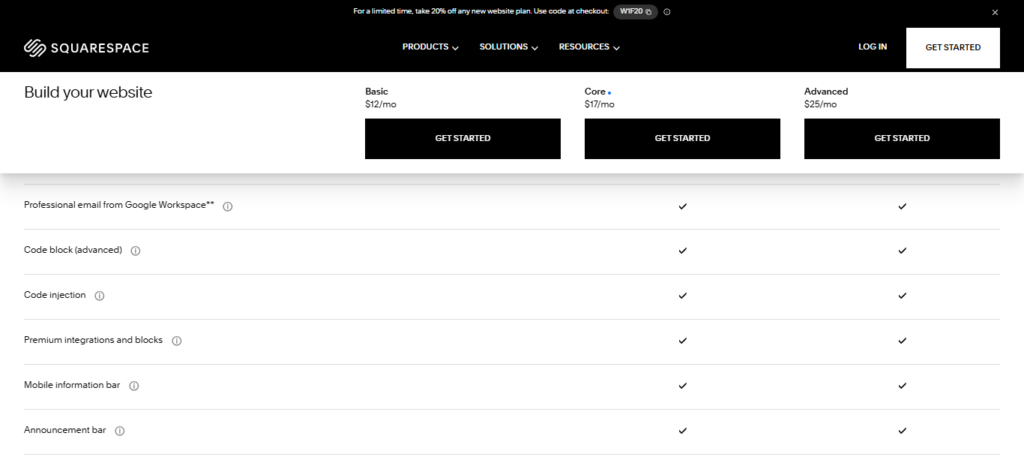
Annual billing provides the best value, and the free trial lets you explore the platform before committing.
Pros and Cons of Squarespace Website Builder
When evaluating the Squarespace website builder, it is important to understand both the advantages and the limitations of the platform.
Below is a balanced summary of the primary pros and cons that potential users should consider before choosing Squarespace for their website project.
Pros of Squarespace Website Builder
1. Professional, Attractive Templates
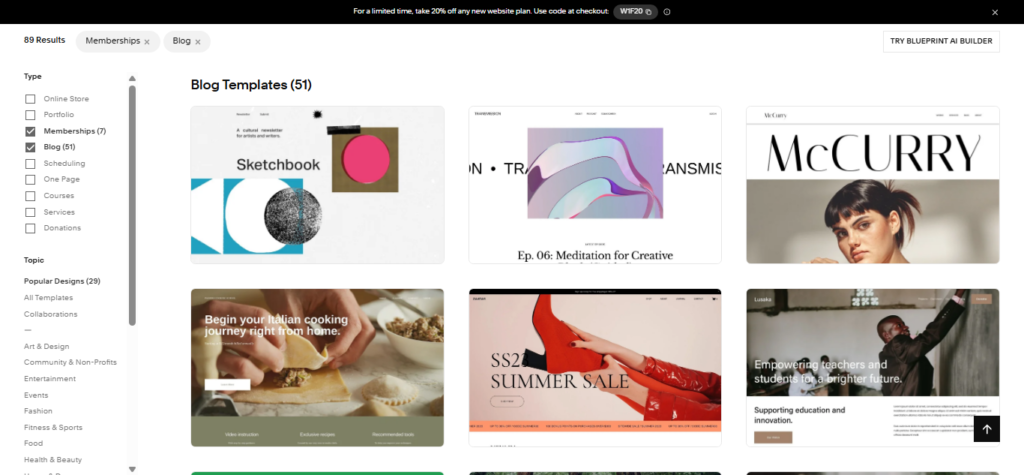
One of the strongest selling points of the Squarespace website builder is its collection of visually appealing, professionally designed templates.
These layouts are modern, responsive, and suitable for a wide range of uses, from portfolios and blogs to ecommerce stores, helping users create a polished site quickly.
2. User-Friendly Drag-and-Drop Editor
Squarespace’s intuitive visual editor allows users to build and customize pages without writing code. Content blocks can be added and rearranged easily, making layout editing accessible for beginners.

3. All-in-One Platform with Built-in Tools
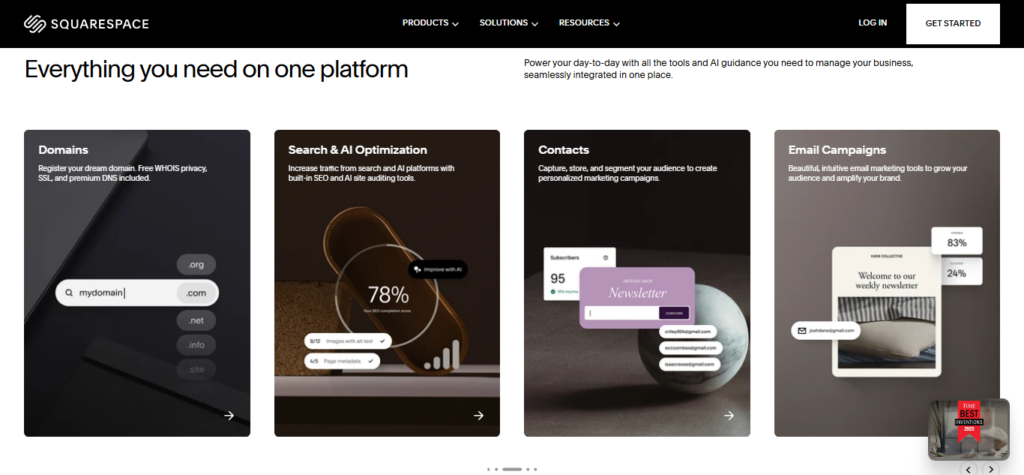
The Squarespace website builder includes hosting, SSL security, domain management, and integrated tools for blogging, ecommerce, and analytics. This reduces the need to manage separate services or plugins.
4. Ecommerce Support on Most Plans
Squarespace supports online selling on most pricing tiers, with features such as product catalogs, shopping cart functionality, and secure checkout. Higher tiers add advanced selling tools such as abandoned cart recovery and subscription products.
5. Unlimited Storage and Bandwidth
Most plans include unlimited storage and bandwidth, meaning users do not need to worry about exceeding limits as they add content and media to their site.

Cons of Squarespace Website Builder
1. No Free Plan
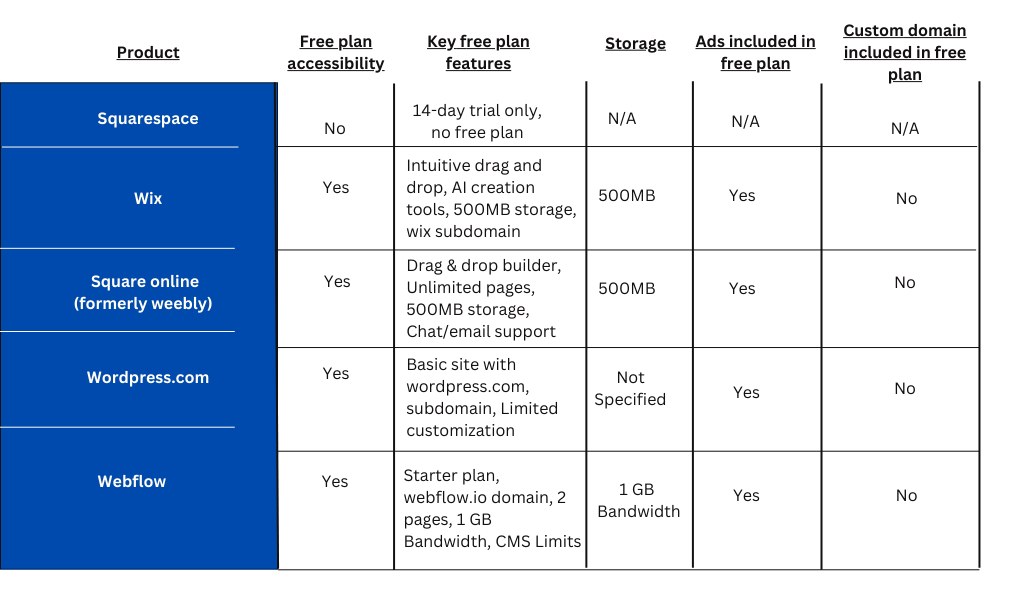
While Squarespace offers a 14-day free trial, it does not have a permanently free tier. For users on a tight budget, this can be a disadvantage compared to other website builders that include free plans.
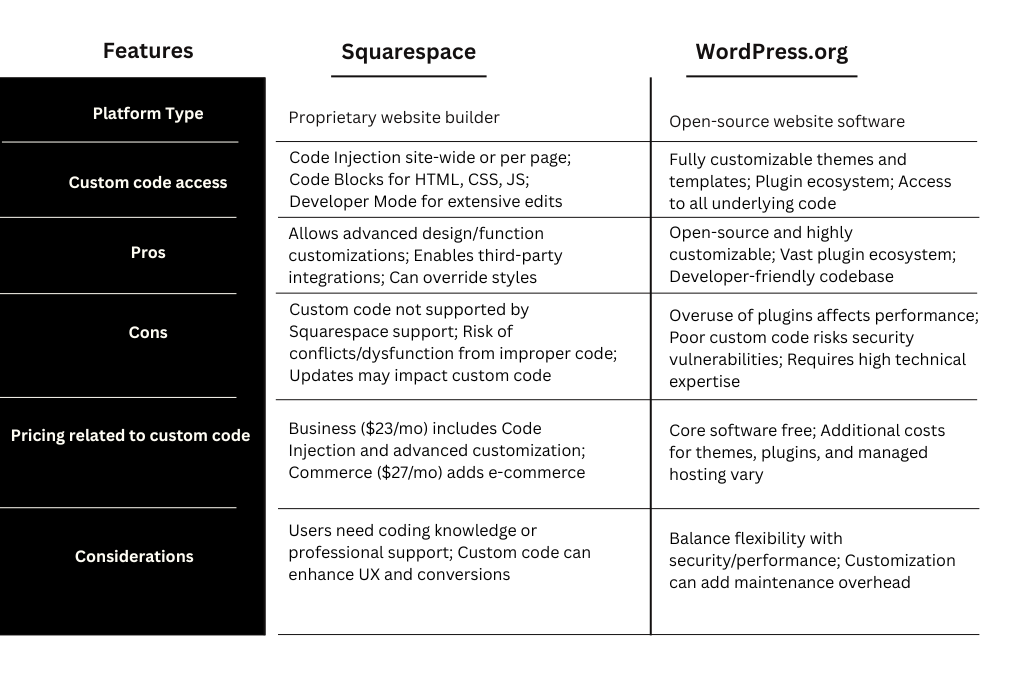
2. Limited Customization and Flexibility
Despite its ease of use, the Squarespace website builder’s structure can feel restrictive for users who want deep customization or full control over site code. Advanced developers may prefer platforms with open code access and larger plugin ecosystems.
 3. Smaller Third-Party App Ecosystem
Squarespace’s library of third-party integrations and apps is limited compared to competitors with extensive marketplaces.
This can restrict the functionality users can add without workarounds.

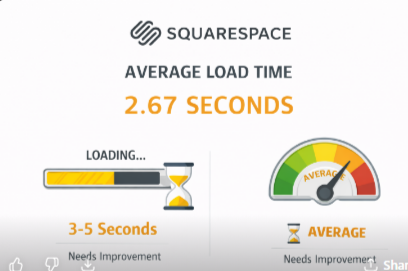
4. Site Speed and Performance Considerations
Some users report slower page load times on Squarespace sites, particularly those with heavy media or complex layouts, which can impact user experience and search performance.
5. Support Limitations
While customer support is available via live chat and email around the clock, Squarespace does not offer phone support.
Some users find this less responsive than direct call options, particularly for urgent issues.
Summary:
The Squarespace website builder delivers a visually rich, user-friendly platform that is well suited for creatives, small business owners, and anyone who wants to launch a professional website quickly and with minimal technical overhead.
However, users requiring extensive customization, advanced integrations, or free hosting options may find limitations in the platform’s structure and pricing.
Balancing these pros and cons will help you determine whether Squarespace aligns with your project goals and technical preferences.
Squarespace Website Builder vs Competitors
When evaluating the Squarespace website builder, it is useful to compare it with other popular platforms to see how it stacks up in terms of usability, design, ecommerce, customization, and overall value.
Below are comparisons with the most common alternatives: Wix, WordPress, and Shopify.
Squarespace vs Wix
Overview:
Both Squarespace and Wix are all-in-one website builders that include hosting, security, templates, and visual editors. They target users who want to build professional websites without coding.
Ease of Use:
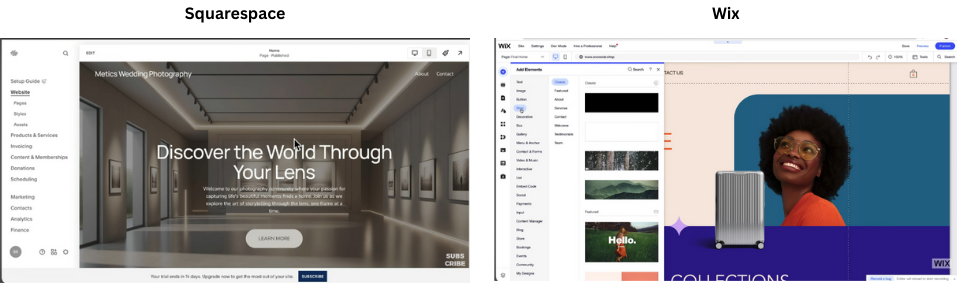
- Squarespace offers a structured editor with a cleaner visual grid and consistent design elements, making it easier for many users to produce attractive sites quickly.
- Wix provides a more free-form drag-and-drop editor, which can be more flexible but also overwhelming for beginners.
Design and Customization:
- Squarespace is known for its high-quality, modern templates focused on minimalist aesthetics.
- Wix offers a much larger selection of templates and deeper customization controls, allowing users to place elements almost anywhere.
Features and Integrations:
- Wix: has a larger app marketplace with many third-party integrations.
- Squarespace: has fewer integrations but includes many built-in features like blogging, ecommerce, and marketing tools without add-ons.
Pricing:
Wix typically offers lower-entry pricing and a free plan, which Squarespace does not.
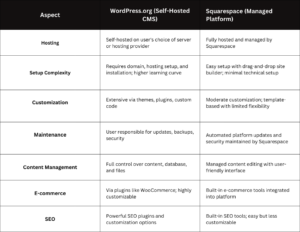
Squarespace vs WordPress
Overview:
WordPress (especially the self-hosted WordPress.org version) is a highly flexible content management system (CMS), while Squarespace is a hosted website builder with everything included.
Customization and Extensibility:
- WordPress excels in flexibility with thousands of themes and plugins, allowing advanced customization for almost any use case.
- Squarespace’s ecosystem is more limited, though its design tools are simpler and more consistent.
Technical Management:
- WordPress requires separate hosting, updates, security management, and backups, which means more control but also more complexity.
- Squarespace manages hosting, security, and maintenance for you, which is easier for non-technical users.
Overview:
While Squarespace includes ecommerce functionality, Shopify is a dedicated ecommerce platform designed primarily for online stores.
Ecommerce Capabilities:
- Shopify offers advanced ecommerce features such as extensive payment gateways, inventory management, multichannel selling, and deep sales analytics.
- Squarespace supports ecommerce well for small to medium stores with basics like product catalogs, shopping carts, and checkout, but it is not as feature-rich as Shopify for larger stores.
Scalability:
- Shopify scales easily for large inventories and multiple sales channels, making it suitable for growing businesses.
- Squarespace ecommerce works well for smaller stores and creative brands but can be limiting for highly complex ecommerce needs.

Summary Comparison
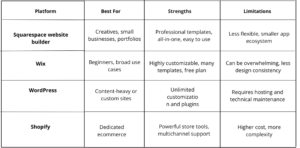
This comparison highlights how the Squarespace website builder fits into the broader landscape of site builders.
It excels in design quality and simplicity, while alternatives may offer stronger ecommerce tools, greater extensibility, or lower starting costs depending on your specific needs.
Who Should Use Squarespace Website Builder?
The Squarespace website builder is designed for users who want a professional, visually polished website without dealing with complex technical setup.
While it may not be the best fit for every use case, it is an excellent choice for specific types of users and projects.
Below are the groups that benefit most from using the Squarespace website builder.
Creatives and Portfolio-Based Professionals
Squarespace is especially well suited for creatives such as photographers, designers, artists, writers, and videographers.
Its design-focused templates and layout control make it easy to showcase visual work in a clean, professional way. Portfolio pages, image galleries, and full-width layouts are simple to set up and maintain. 
Small Business Owners and Service Providers
The Squarespace website builder is a strong option for small businesses that need an online presence without hiring a developer.
Service-based businesses such as consultants, coaches, freelancers, and local businesses can quickly create pages for services, pricing, testimonials, and contact forms.
Built-in tools like scheduling integrations, email campaigns, and basic analytics help small business owners manage their websites efficiently from one platform.

Bloggers and Content Creators
For bloggers and content creators who value design and simplicity, Squarespace provides a solid blogging system with post scheduling, categories, tags, and built-in SEO settings. The editor allows for visually rich posts with images, videos, and custom layouts, making it ideal for lifestyle, travel, and creative blogs.

Entrepreneurs Running Small Online Stores
The Squarespace website builder works well for entrepreneurs and creators selling a limited number of products. This includes digital products, handmade goods, memberships, or branded merchandise. Ecommerce features are easy to manage and tightly integrated with the website design.
However, it is best suited for small to medium-sized stores rather than large, complex ecommerce operations.

Beginners Who Want an All-in-One Solution
Squarespace is ideal for beginners who want a complete website solution without worrying about hosting, security, updates, or plugins.
Everything is handled within one dashboard, which reduces complexity and ongoing maintenance.
Users who prefer a guided, structured website-building experience often find the Squarespace website builder easier to manage than more open-ended platforms.
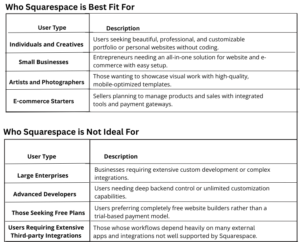
Who Squarespace May Not Be Best For
While powerful, the Squarespace website builder may not be the best choice for:
- Users who need advanced custom code or complex functionality
- Large ecommerce businesses with extensive product catalogs
- Developers who want full backend control and third-party plugin access
Summary:
The Squarespace website builder is best suited for creatives, small business owners, bloggers, and beginners who prioritize design, simplicity, and an all-in-one website solution.
If your goal is to launch a professional-looking website quickly and manage it easily over time, Squarespace is a strong and reliable option
Is Squarespace Website Builder Worth It?
If you are considering building a website and evaluating your options, one of the key questions is whether the Squarespace website builder delivers enough value for its cost and features.
Below is an objective assessment to help you determine if Squarespace is worth using for your project.
Strong Design and User Experience
One of the biggest advantages of the Squarespace website builder is its emphasis on professional design and user experience.
The platform offers a curated set of high-quality templates that look modern and polished on desktops and mobile devices.
For users who want a visually appealing site with minimal effort, Squarespace often delivers better results compared to many competitors.

All-in-One Platform Simplifies Setup
Squarespace includes hosting, SSL security, domain management, design tools, blogging, analytics, and basic marketing features all within a single interface.
This reduces the need to integrate multiple services or manage technical infrastructure.
If your priority is to get a professional website online quickly without juggling separate tools, Squarespace’s integrated approach is a significant benefit.

Good — But Not the Most Advanced — Ecommerce Features
The Squarespace website builder supports online stores, including product galleries, secure checkout, inventory tracking, and promotional tools.
For small to medium-sized ecommerce businesses, this level of functionality is usually sufficient.
However, if you anticipate needing advanced ecommerce capabilities (such as complex inventory rules, multi-channel selling, or enterprise-level sales analytics), dedicated ecommerce platforms like Shopify may offer more depth.

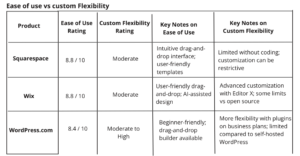
Ease of Use vs Flexibility
Squarespace hits a strong balance between ease of use and design control, making it an excellent choice for beginners and non-technical users. However, this simplicity comes with trade-offs in flexibility:
- You cannot install as many third-party plugins as you can on open platforms like WordPress.
- Deep customization via code is limited compared to developer-oriented systems.
If you want advanced custom features or maximum flexibility, Squarespace may feel restrictive. But for many users, the trade-off is worthwhile because it streamlines the building process.
Pricing and Value
The Squarespace website builder is priced competitively, with plans that include hosting, security, and built-in tools. While there is no free plan, the platform’s 14-day free trial lets you explore features before committing.
When compared with assembling a site using separate hosting, plugins, and security tools, Squarespace’s bundled pricing can deliver good overall value, particularly for individuals, creatives, and small businesses.

Support and Resources
Squarespace offers 24/7 email support and live chat during business hours. Additionally, an extensive knowledge base and community resources help users troubleshoot issues and learn best practices.
While some competitors offer phone support, Squarespace’s support options are generally considered responsive and helpful for most use cases.

Final Verdict
Yes, the Squarespace website builder is worth it for many users — especially those who:
- Want a professional-looking site quickly
- Prefer an all-in-one solution without managing hosting or plugins
- Are focused on design quality and ease of use
- Run small businesses, portfolios, blogs, or modest ecommerce stores
For users who need deep customization, complex functionality, or enterprise-level ecommerce, other platforms might be a better fit. However, for most standard website needs, Squarespace provides a reliable, polished, and convenient solution.
Why choose squarespace:
- User-friendly, drag-and-drop editor—no coding required
- Professionally designed, mobile-optimized templates for all industries
- All-in-one platform: website, blog, e-commerce, and analytics built in
- Integrated e-commerce tools, including no transaction fees on commerce plans
- Built-in marketing and SEO features to grow your audience
- Free SSL and WHOIS privacy with domain registration
- AI-powered Blueprint Builder for rapid website setup
FAQs About Squarespace Website Builder
Below are answers to some of the most frequently asked questions about the Squarespace website builder. These FAQs are designed to address common concerns, clarify features, and help users decide whether Squarespace is the right platform for their needs.
Is Squarespace Website Builder Good for SEO?
Yes, the Squarespace website builder includes built-in SEO tools that allow users to optimize page titles, meta descriptions, URLs, and image alt text. It also generates automatic sitemaps and uses clean, search-engine-friendly code. While it may not offer the same level of SEO flexibility as advanced platforms like WordPress, it is more than sufficient for most small businesses, blogs, and portfolio websites.

Is Squarespace Better Than Wix?
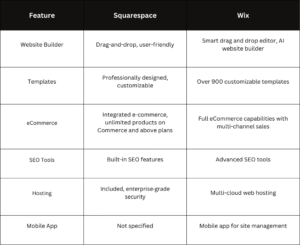
Squarespace and Wix serve similar audiences, but they differ in approach. Squarespace focuses on design consistency, polished templates, and a more structured editing experience.
Wix offers greater freedom and a larger app marketplace but can feel overwhelming to some users.
The better choice depends on whether you value design simplicity (Squarespace) or maximum customization (Wix).
Can Beginners Use Squarespace Website Builder?
Yes, the Squarespace website builder is well suited for beginners. The platform handles hosting, security, and updates automatically, and its visual editor makes it easy to build pages without coding. Most users can launch a basic website within a few hours, even with no prior website-building experience.

Does Squarespace Support Ecommerce?
Yes, Squarespace supports ecommerce on most plans. Users can sell physical products, digital products, services, and subscriptions. Features include product management, inventory tracking, secure checkout, and basic marketing tools. However, it is best suited for small to medium-sized online stores rather than large, complex ecommerce operations.

Does Squarespace Include Hosting?
Yes, hosting is included with every Squarespace plan. The Squarespace website builder is a fully hosted platform, which means you do not need to purchase separate hosting or worry about server management. This simplifies setup and ongoing maintenance.

Can I Use a Custom Domain with Squarespace?
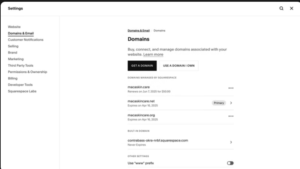
Yes, you can connect a custom domain to your Squarespace website. Squarespace often includes a free custom domain for the first year when you choose annual billing. After the first year, standard domain renewal fees apply.
Can I Switch Templates After Publishing?
Yes, you can change templates even after your site is live. The Squarespace website builder allows you to preview how your content will look with different templates before making the change public. Some design adjustments may be required, but your core content remains intact.

Does Squarespace Offer Customer Support?
Squarespace provides 24/7 email support and live chat support during business hours.
It also offers an extensive knowledge base, tutorials, and community resources.
While phone support is not available, most users find the existing support options sufficient.

Summary:
These FAQs cover the most common questions users have about the Squarespace website builder.
If you are looking for a platform that combines ease of use, professional design, and built-in tools, Squarespace continues to be a reliable and popular choice for a wide range of website projects.
Conclusion: Is the Squarespace Website Builder the Right Choice for You?
The Squarespace website builder is a strong option for users who want a professional, visually polished website without dealing with complex technical setup.
With its high-quality templates, all-in-one platform, built-in SEO tools, and reliable hosting, Squarespace makes it easy to launch and manage a website efficiently.
Squarespace is especially well suited for creatives, small business owners, bloggers, and entrepreneurs who value design, simplicity, and convenience.
While it may not offer the same level of flexibility, or advanced functionality as open-source platforms or dedicated ecommerce systems, it delivers a well-balanced solution for most standard website needs.
If you are ready to create a professional website with minimal hassle, start a free trial and explore what the Squarespace website builder can do for your project.
Testing the platform firsthand is the best way to determine if it aligns with your goals.